

Just before Christmas, Creative Bloq published its round-up of the graphic design trends to expect in 2026. The first trend on the list had a blunt name: Anti-AI Crafting. Graham Sykes, global executive creative director at Landor, described it as a response to an algorithm-saturated world, saying that “human-driven craft is coming sharply back into focus as the antidote to AI’s hyper-slick visual language.” A few days later the same publication covered Canva’s own forecast, which calls 2026 “the year of ‘Imperfect by Design'”. In our reading, both point to something that starts before any tool is opened: the design brief.
It is easy to read those forecasts as a rejection of AI. We read them differently. The complaint is that so much of what comes out of AI tools looks the same: the same smooth gradients, the same centred hero, the same three rounded cards, the same friendly sans-serif. And most of that sameness is not the model’s fault. It comes from what the model was given, which is usually one short sentence.
Meanwhile, the web platform keeps moving. On 13 January Firefox 147 added CSS anchor positioning, so tooltips and menus can now be attached to their buttons in pure CSS across the major browsers. We will come back to that next month, when we look at asking AI for modern code. This first guide of the year starts one step earlier, before any prompt is written. It is about the design brief: what it is, why AI needs one even more than a human designer does, and how to write one that a model can actually use.
Why vague input gives generic output
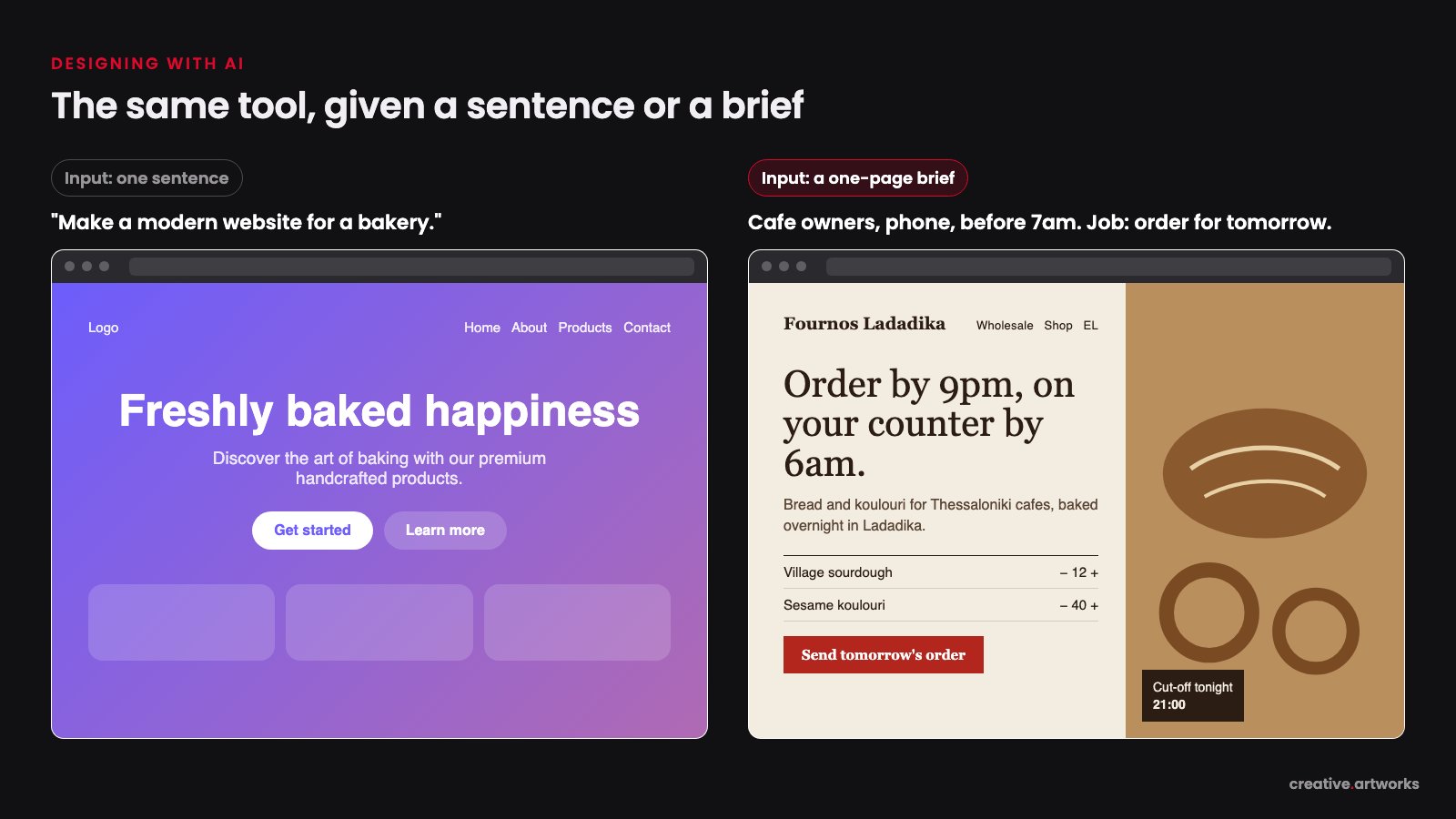
Language models produce the most likely continuation of what they are given. When the input is “make a modern website for a bakery”, the most likely answer is an average of every bakery site, landing page and component library the model has seen. Anthropic explained this plainly in a November 2025 post on frontend design: safe design choices that “work universally and offend no one” dominate web training data. Without direction, the post says, the model samples from that “high-probability center”, which produces what users have come to call the AI slop aesthetic.
Independent testing points the same way. The Nielsen Norman Group put several AI prototyping tools through realistic design tasks in October 2025. Where the prompt did not specify a visual style, the tools produced “a similar, generic look” built on a sans-serif typeface and minimal styling. The researchers’ summary of the results is worth remembering: AI output can be “good from afar, but far from good.”
The same study found a subtler problem. Several tools read the word “profile” as a social-media profile and built something closer to a LinkedIn banner, which pushed the content the user actually needed further down the page. The model did not misbehave. It filled a gap in the instructions with the most common meaning of a word. That is the core lesson of this article: every gap in your input will be filled with the average. If you do not decide, the model decides for you, and it decides the way everyone else’s model did.
A human designer handed a one-line request would push back. They would ask who the site is for, what it needs to achieve, what the owner likes and dislikes, what content exists. A model usually just starts. So the questions a designer would ask have to be answered before you begin, and written down. That written answer is the design brief.
Content first: write the words before the layout
The single most useful thing you can bring to an AI design session, and the heart of any design brief, is your real content. Not lorem ipsum, not “Headline goes here”, but the actual headline, the actual opening hours, the three things customers ask about most. Lovable’s prompting guide puts it simply: “The fastest way to show intent is to use real words.” Real copy also exposes layout problems early, because a real heading has a real length, and a real menu has eleven items, not four.
AI makes content-first even more important, because layout follows content. A page for a bakery that sells mostly to cafes at six in the morning has a different hierarchy from a page for a bakery that sells birthday cakes to families. If the model only knows “bakery”, it invents a hierarchy. If it knows that wholesale orders are the main business and the order form is the most important thing on the page, it can put the form where it belongs.
Before you write any prompt, gather three things:
- The job of the page. One sentence on what a visitor should be able to do or decide after visiting. “Place a wholesale order for tomorrow” is a job. “Showcase our brand” is not.
- The content inventory. Every piece of text, image, list and form the page needs, in rough order of importance. It does not have to be polished, but it has to be real.
- The facts only you know. Names, places, numbers, history, the way the owner talks about the business. These are what make the page belong to one business and no other.
If you cannot fill in these three, the problem is not the prompt. The project is not ready for design yet, with or without AI.
What a design brief AI can use
A good design brief for a model looks a lot like a good brief for a person, with two differences: it has to be explicit about things a person would infer, and it has to describe visual ideas in words rather than in a shared glance at a mood board. Figma’s own tips for its Make tool, published in June 2025, make the same point: “The more detail you include about your design in the initial prompt, the fewer follow-up exchanges you’ll need to get the result you want.” Everything after that first message builds on it, so its gaps become the project’s gaps.
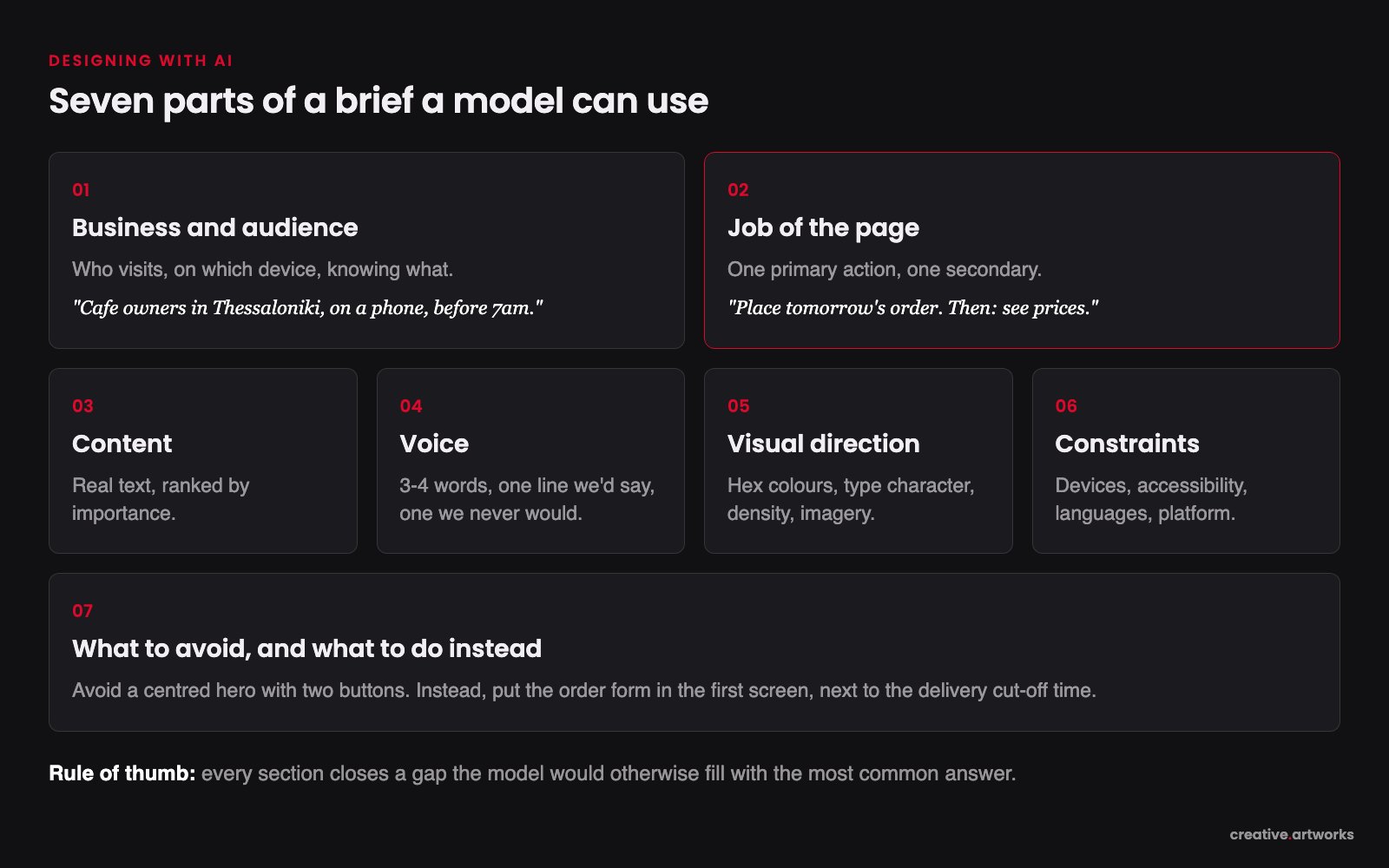
Vercel’s guide to prompting v0, published in December 2025, groups the essentials into three inputs: the product surface (the actual components, data and actions), the context of use (who uses it, when, and what decision they are making) and constraints and taste (style, platform, layout, colour and accessibility). We find it helpful to expand those into seven short sections.
The seven parts of a design brief
- Business and audience. Who the business is, who the visitors are, and what they already know when they arrive. “Owners of small cafes in central Thessaloniki, ordering on a phone, often before 7am” tells the model more than “customers”.
- The job of the page. The one action or decision that matters most, and what comes second.
- Content. The real text and the content inventory, in order of importance.
- Voice. Three or four words for how the business sounds, plus one sentence it would say and one it would never say.
- Visual direction. Concrete decisions: colours as hex values, the character of the typefaces, the density of the layout, the kind of imagery.
- Constraints. Devices, accessibility level, languages, the platform it will be built on, anything that must stay as it is.
- What to avoid. The defaults you do not want, named specifically.
Turn references into words
Most people collect visual references as screenshots. They are useful, but a model cannot always read the decisions inside an image. NN/g found that the higher the fidelity of an attached file, the more accurately the design was translated, with a linked Figma frame doing best, and noted the caveat that by then much of the design work is already done. For early exploration, describe why a reference works instead. “Large serif headings, lots of cream space, photos cropped tight on hands and dough, one red accent used only for the order button” is a design decision a model can apply. “Like the site I sent you” is not.
Name the defaults, then give the alternative
Telling a model what to avoid helps, but only halfway. If you only ban a purple gradient, the model will reach for the next most common choice. Pair every “avoid” with a “do instead”: avoid a centred hero with two buttons; instead, put the order form in the first screen with the delivery cut-off time next to it. The brief should narrow the space of possible answers, not just remove one of them.
Prompt · turn rough notes into a structured brief · Source: Written for this article
You are helping me write a design brief before any design work starts.
Here are my rough notes about the business and the page:
[paste notes, emails, existing copy]

Turn them into a one-page brief with these sections:
1. Business and audience (who visits, on what device, what they already know)
2. The job of the page (one primary action, one secondary)
3. Content inventory, in order of importance, using my real text
4. Voice (3-4 words, one sentence we would say, one we would never say)
5. Visual direction (colours as hex, type character, density, imagery)
6. Constraints (devices, accessibility, languages, platform)
7. What to avoid, each paired with what to do instead

Do not invent facts. Where my notes are missing something,
write [MISSING: question] instead of filling the gap.
From design brief to prompt
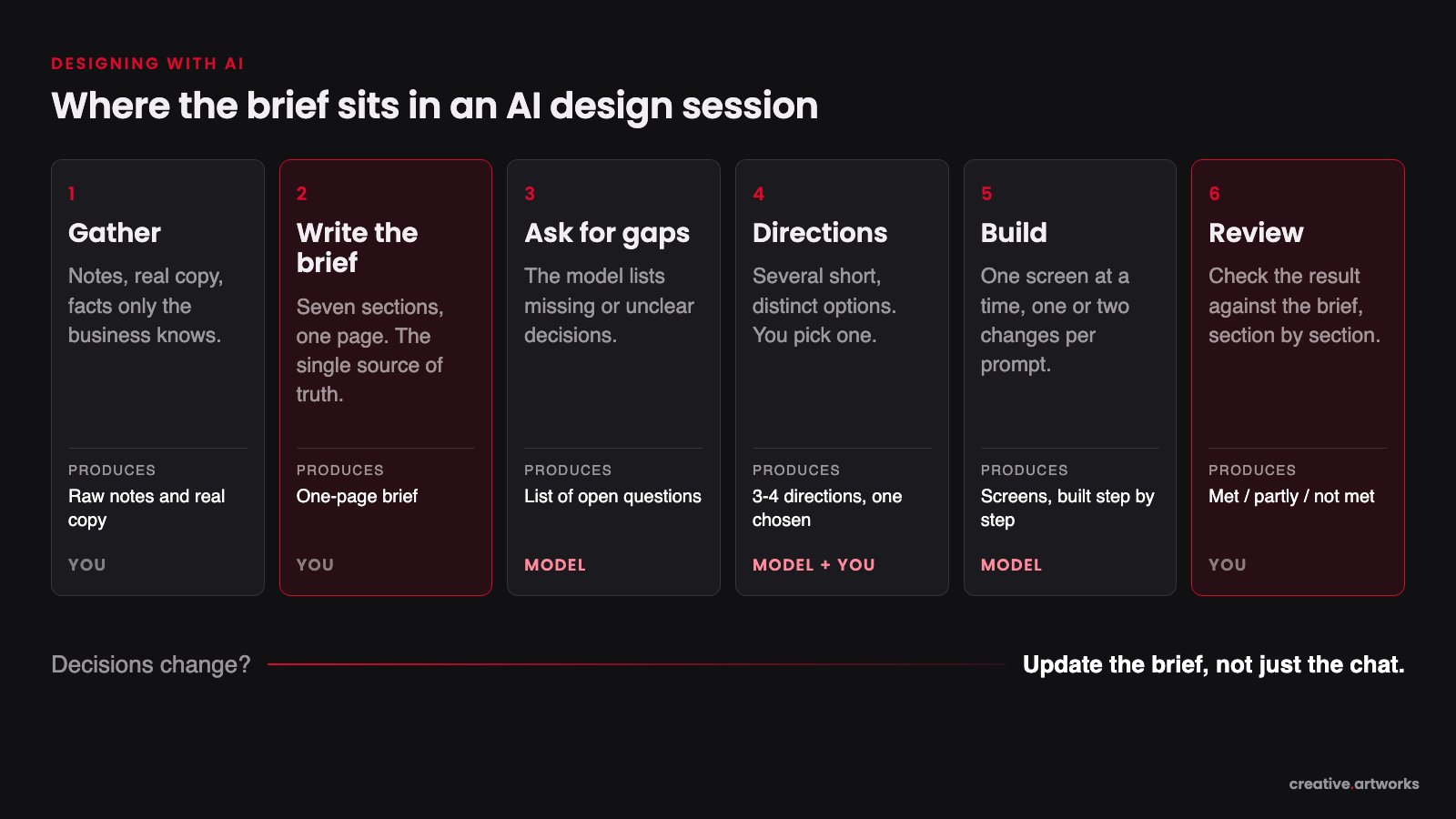
Once the written brief exists, the prompts become shorter, not longer. Keep the brief as a separate document, paste or attach it at the start of a session, and then let each prompt do one job: “Using the brief, design the first screen on mobile.” This keeps the brief as the single source of truth and stops it from being diluted across a long chat.
Three habits make the step from brief to prompt work better.
Let the model ask first. Lovable’s guide recommends ending a prompt with a line inviting questions. It is one of the cheapest ways to catch a gap. A model asked to list what is unclear will often find the exact thing you forgot to decide.
Prompt · find gaps before building · Source: Lovable, Prompting best practices (last line verbatim)
Here is the design brief for [page name]: [paste brief]
Before you design anything, read the brief and tell me
which decisions are missing or ambiguous.
Ask me any questions you need in order to fully understand
what I want from this feature and how I envision it.
Ask for directions before details. Instead of one finished page, ask for several short, clearly different directions and pick one. Figma’s 2025 AI report found that 60% of successful AI builders said they explored multiple design or technical approaches, against 39% of unsuccessful ones. That is a correlation, not proof, but it matches what you would expect: choosing between options is where human judgment does its best work.
Make one change at a time. Google’s Stitch prompt guide recommends focusing on one screen or component and making “one or two adjustments per prompt”. The same guide notes that adjectives set the feel of the result, influencing colours, fonts and imagery. Choose them in the brief, deliberately, rather than letting them slip into a prompt as an afterthought.
Prompt · first screen from the three inputs · Source: Vercel, How to prompt v0 (adapted)
Using the attached brief, build the first mobile screen of [page].
Product surface: [exact components, data and actions, e.g. order form
with product list, quantity steppers, delivery time and a Send order button].
Context of use: [who], [when], deciding [what], with [how much time].
Constraints and taste: [colours as hex], [type character],
[density], WCAG 2.2 AA contrast, works at 360px wide.
Use only the real text from the brief. No placeholder copy.
Where human craft comes back in
The trend forecasts were right about one thing: in a year when everyone can generate a passable page in a minute, the parts that cannot be generated become the parts that matter. But “anti-AI crafting” does not have to mean drawing every letter by hand. In a web project, the human craft lives mostly in the design brief and in the review.
Look at what the seven parts of the brief contain. The audience and the job of the page come from talking to the business. The content comes from the people who run it. The voice is theirs. The visual direction is a set of decisions someone has to make and be able to defend. None of that is in any training set, because it is specific to one business at one moment. A model can execute those decisions remarkably well. It cannot make them for you.
There is also a craft in saying no. A model will happily add a testimonial carousel, a newsletter pop-up and a row of statistics because pages like this usually have them. A brief that states what the page is for gives you a reason to cut them. Restraint is one of the clearest signals that a person made decisions, and it costs nothing to generate.
Finally, the brief is what makes AI output reviewable. Without it, feedback turns into taste against taste: “I don’t like it” versus “it looks modern”. With it, you can ask concrete questions. Is the order form in the first screen? Is the cut-off time visible? Is the red accent used only on the primary action? A brief turns review from opinion into checking.
Prompt · review a design against the brief · Source: Written for this article
Here is our design brief: [paste brief]
Here is the current design: [attach screenshot or paste code]

Check the design against the brief, section by section.
For each section, answer: met, partly met or not met,
and point to the exact element that proves it.
Then list any element on the page that the brief does not ask for,
and say whether it supports the job of the page or distracts from it.
Do not suggest new features.
A one-page brief checklist
Before you open any AI design tool, run through this list. If you can tick every item, you are ready to prompt.
- I can state the job of the page in one sentence, starting with a verb.
- I know who the main visitor is, which device they use and what they already know.
- I have the real content, in order of importance, including the primary call to action.
- I have three or four voice words, one sentence we would say and one we never would.
- I have colours as hex values and a description of the typefaces’ character.
- I have described my references in words: what exactly I like about each one.
- I have listed the constraints: devices, accessibility level, languages, platform.
- I have named the defaults to avoid, and for each one, what to do instead.
- I have asked the model to list missing or unclear decisions before it builds anything.
- I will use the same brief to review the result, section by section.
A written brief takes an hour, sometimes less. And it is the part of the work where the business, its people and its specifics enter the design. The model brings speed. The brief brings everything that makes the result belong to you.
Next month we look at the code side: AI still tends to write CSS the way it was written years ago, and we will show which modern features to ask for by name. If you would like help turning your own notes into a brief for your next site, get in touch.
Part of our Designing with AI series: one practical guide on the 15th of every month about using AI for interface design, web design and templates, and doing it well.
Keep reading. Next: Ask AI for modern CSS, not 2019 CSS. All articles in Designing with AI.
Sources
- Creative Bloq: Texture, warmth and tactile rebellion: the big graphic design trends for 2026
- Creative Bloq: Canva’s 2026 trend predictions have filled me with hope
- Mozilla: Firefox 147.0 release notes
- Anthropic: Improving frontend design through Skills
- Nielsen Norman Group: Good from Afar, But Far from Good: AI Prototyping in Real Design Contexts
- Vercel: How to prompt v0
- Figma: 8 essential tips for using Figma Make
- Lovable: Prompting best practices
- Google AI Developers Forum: Stitch Prompt Guide
- Figma: Figma’s 2025 AI report: Perspectives from designers and developers