


On 12 February, the browser makers announced Interop 2026, this year’s joint effort to make key web features work the same way in every browser. The list has 20 focus areas, and it reads like a modern CSS wish list for interface designers: anchor positioning, container style queries, dialogs and popovers, scroll-driven animations, view transitions, scroll snap, and new CSS functions such as contrast-color() and shape().
The previous round delivered. Mozilla’s announcement notes that the overall Interop score rose from 25 to 95 during 2025, and that features such as same-document view transitions and CSS anchor positioning became available across browsers. The last piece of anchor positioning arrived only last month: web.dev reported that Firefox 147, released on 13 January, made the feature Baseline Newly available.
So the platform is in a very good place. The trouble is that many AI coding tools have not caught up. Ask one for a tooltip, a responsive card or a page transition, and you will often get code that would have looked normal years ago: a JavaScript positioning library, a pile of media queries, a scroll listener. It works, more or less. But it is heavier, harder to maintain and less resilient than what the browser can now do on its own. In January we argued that the brief comes before the prompt. This month is about what to put in the technical part of that brief: which modern CSS features to ask for by name, and how to check that you got them.
Why AI writes yesterday’s CSS
A language model learns from code that already exists. Older techniques have had many more years to accumulate tutorials, answers, templates and repositories, so they carry much more weight in the training data than a feature that shipped last year. The developer Declan Chidlow put the timing problem well in a 2025 essay: “By the time everything has been scraped and a dataset has been built, the set is on some level already obsolete.”
That has two consequences. First, the model may not know about a feature at all, or may know an early, since-changed version of its syntax. Anchor positioning is a good example. During standardisation, inset-area was renamed position-area and position-try-options became position-try-fallbacks, as Chrome’s developer blog documented, so older examples online do not match what browsers ship today. Second, even when the model knows a modern feature, it will not reach for it unless asked, because the older pattern is the statistically safer answer. This is the same pull towards the average that we described for visual design in January, applied to code.
The fix is not to stop using AI for front-end work. It is to stop leaving the technical choices to its defaults. If you name the features you want, set the browser support you need and ask for fallbacks, most current models will produce noticeably better code. And if you know what modern CSS looks like, you can spot when they have not.
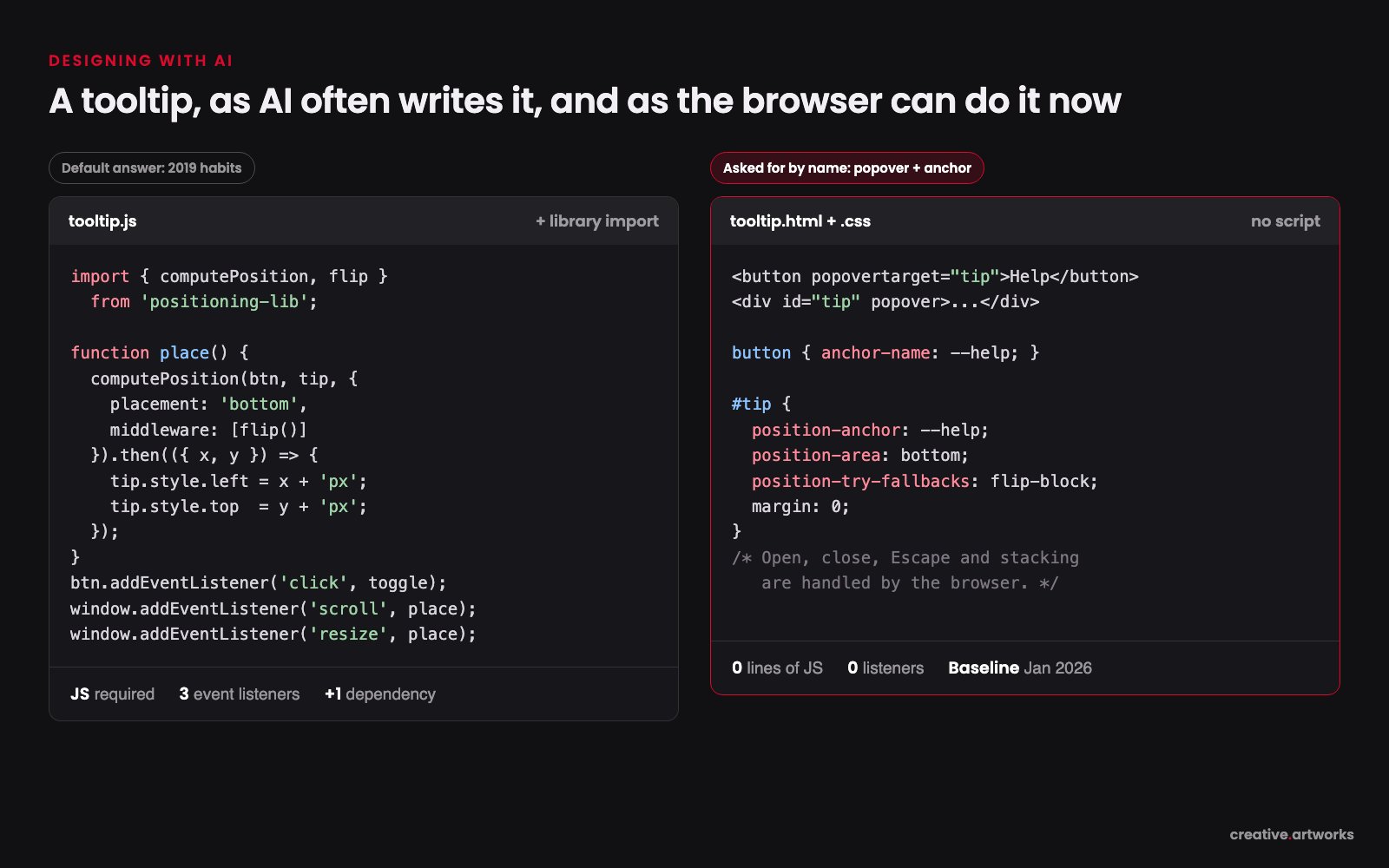
Status words for new CSS features
Before asking for any feature, you need to know whether you can use it. The quickest shorthand is Baseline, the cross-browser status shown on MDN, web.dev and many other references. Its definitions are simple. A feature is Baseline Newly available when it “is supported by all of the core browsers, and is therefore interoperable”. The core set is Chrome, Edge, Firefox and Safari, on desktop and mobile. A feature becomes Baseline Widely available once “30 months have passed since the newly interoperable date”, which is the point where most sites can use it without a second thought.
This gives you a practical rule for prompts. Widely available features can be used freely. Newly available features are fine for most projects, as long as a visitor on an older browser still gets something usable. Features that are not yet Baseline should be treated as progressive enhancement: nice when supported, invisible when not. Write that rule into your prompt and the model has a framework for every decision it makes.
Five modern features to ask for by name
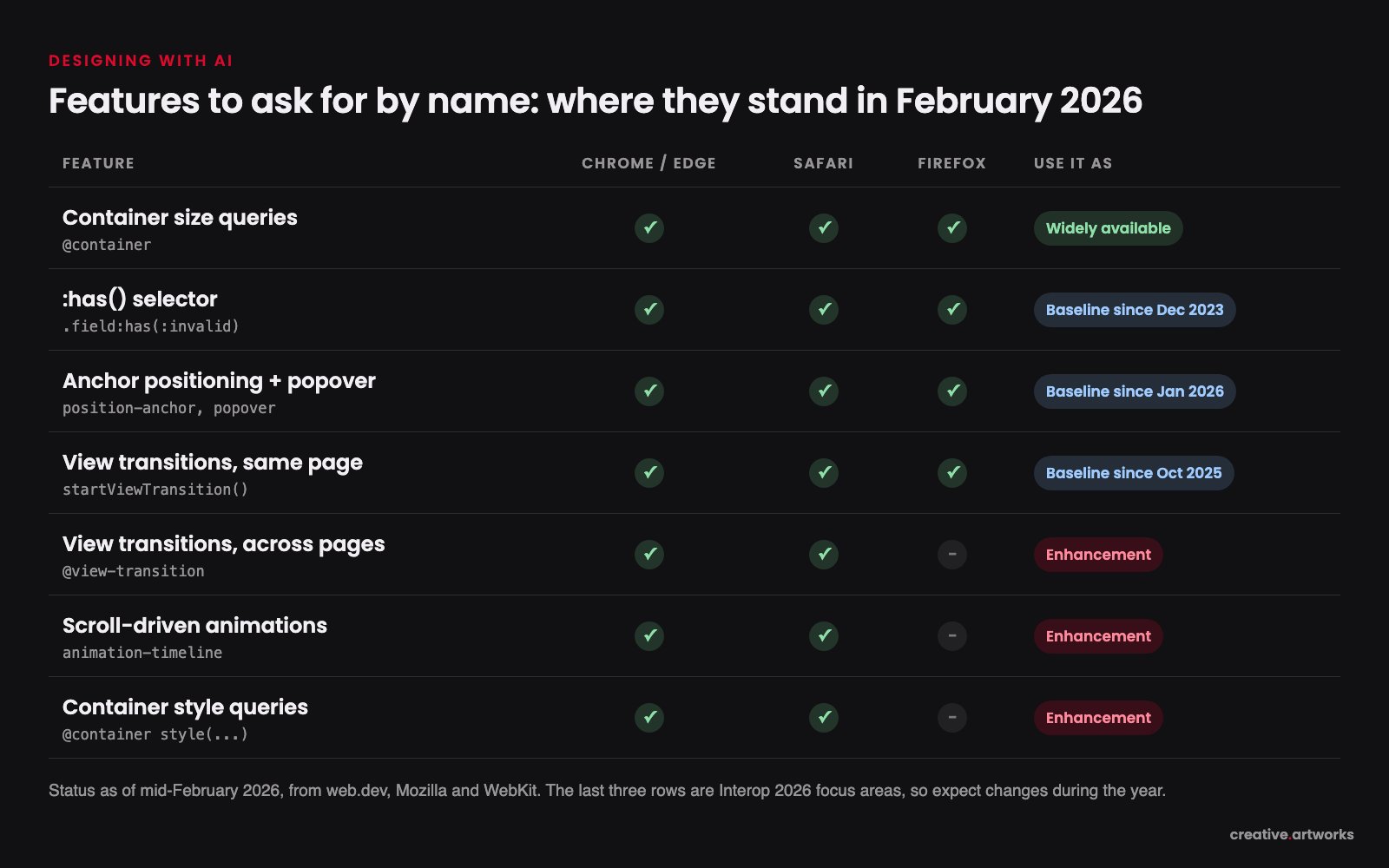
There are many new CSS features. These five solve problems that come up on almost every site, and they are the ones AI tools most often replace with older workarounds. The support notes describe the situation as of mid-February 2026.
Container queries
Media queries ask how wide the screen is. Container queries ask how wide the space for a component is, which is usually the question you actually care about. A product card in a sidebar and the same card in a three-column grid can then adapt on their own, without page-level breakpoints for every layout they might appear in. Size container queries have been Baseline since February 2023 and became Widely available in August 2025, so there is no reason to avoid them. Container style queries, which let a component react to a custom property set on its parent, are an Interop 2026 focus area; Safari shipped them in version 18.0, Chromium browsers support them, and Firefox does not yet.
The :has() selector
Often called the parent selector, :has() lets you style an element based on what it contains. A form field wrapper can show an error style when its input is invalid, a card can change layout when it contains an image, and a page can lock scrolling when a dialog is open. Before :has(), all of these needed JavaScript to add and remove classes. It has been Baseline since December 2023.
Anchor positioning and popover
Tooltips, dropdown menus and small pop-up panels traditionally needed a JavaScript library to measure the trigger element and place the panel next to it, and to move it when the page scrolled or the panel would run off screen. With the popover attribute (Baseline since January 2025) the browser handles opening, closing and stacking. With anchor positioning (Baseline Newly available since January 2026) the panel is tied to its trigger in CSS, using properties such as anchor-name, position-anchor and position-area, and position-try-fallbacks can flip it to the other side when there is no room.
View transitions
View transitions animate between two states of a page, such as a list item expanding into a detail view, with the browser capturing the before and after states. Same-document view transitions became Baseline in October 2025. Cross-document view transitions, which animate between separate pages of an ordinary multi-page website with a single CSS rule, shipped in Safari 18.2 and in Chromium browsers, and are part of Interop 2026. For a typical brochure site, the cross-document version is the interesting one, and it degrades gracefully: browsers without support simply load the next page as usual.
Scroll-driven animations
Progress bars that fill as you read, images that ease in as they enter the viewport, headers that shrink: these used to rely on scroll event listeners, which are easy to get wrong for performance. Scroll-driven animations link a CSS animation to scroll position instead. WebKit shipped them in Safari 26.0, Chromium browsers support them, and they are an Interop 2026 focus area, but Firefox does not support them yet. Treat them strictly as an enhancement for now, and always pair them with prefers-reduced-motion. We will cover motion properly later in the year.
A few older but still underused features are worth adding to the same list: CSS nesting, subgrid, cascade layers (@layer), text-wrap: balance for headings, and the oklch() colour format. All of them are Baseline. If an AI-generated stylesheet ignores all of these, that alone tells you something about where its habits come from.
How to prompt for modern CSS
The pattern that works is the same one we recommended for briefs: decide, then state the decision. For code, that means four things.
- State the support target. For example: “Use Baseline features freely. Anything not yet Baseline must be a progressive enhancement behind
@supports, and the page must work without it.” - Name the features. Do not ask for “a responsive card”; ask for “a card that uses a size container query on its wrapper”. Named features are much harder for a model to quietly swap for an older pattern.
- Forbid the old patterns. “No JavaScript for positioning, no scroll event listeners, no positioning libraries, no vendor prefixes unless you can tell me which browser still needs them.”
- Ask for the reasoning. Have the model list each modern feature it used, why, and what happens in a browser without support. If it cannot explain the fallback, there probably is not one.
Prompt · a component with a modern CSS contract · Source: Written for this article
Build a [component, e.g. product card] in semantic HTML and CSS.
Support target: use Baseline features freely. Anything not yet
Baseline must be a progressive enhancement inside @supports,
and the component must work without it.
Use: a size container query on the wrapper (not media queries)
for the layout switch at [width]; :has() for [state, e.g. card with image];
CSS nesting; custom properties for colours and spacing.
Do not use: JavaScript for layout, positioning libraries,
vendor prefixes, !important, fixed pixel font sizes.
After the code, list every modern feature you used, its Baseline
status, and what a browser without support will show.
Prompt · tooltip or menu without a positioning library · Source: Written for this article
Create a [tooltip / dropdown menu] for [trigger, e.g. the account button].
Use the HTML popover attribute with popovertarget for open and close.
Attach the panel to its trigger with CSS anchor positioning:
anchor-name on the trigger, position-anchor and position-area
on the panel, and position-try-fallbacks so it flips when there
is no room. No JavaScript for positioning. Keep it keyboard
accessible: focus moves sensibly and Escape closes it.
Explain what happens in a browser without anchor positioning.
If you are working with an existing site, the most useful prompt is often a review rather than a rewrite. Ask the model to audit a stylesheet for outdated patterns and suggest modern replacements one at a time. That keeps changes small and testable, and it teaches you what to look for next time.
Prompt · audit a stylesheet for outdated patterns · Source: Written for this article
Review this CSS and the JavaScript that touches layout:
[paste code]
List every place where a modern, Baseline CSS feature could replace
an older pattern, for example: media queries that should be container
queries, JS class toggling that :has() could handle, JS positioning
that anchor positioning could handle, scroll listeners, float or
clearfix layouts, vendor prefixes no longer needed.
For each: show the current code, the replacement, its Baseline status,
and the risk of changing it. Do not rewrite the whole file.
Prompt · page transitions on a multi-page site · Source: Written for this article
Add cross-document view transitions to this multi-page site
[describe pages]. Use the @view-transition rule with navigation: auto.
Give the [site header / product image] a view-transition-name so it
morphs between [page A] and [page B]. Keep durations under [300ms].
Wrap all motion in @media (prefers-reduced-motion: no-preference).
Confirm that browsers without support simply load the page normally,
and do not add any JavaScript.
Reviewing what comes back
A model’s description of its own code is not proof that it wrote modern CSS. It may say it used a container query and then add a media query next to it, or claim a feature is supported everywhere when it is not. Review the output with a short list of red flags in mind:
- Positioning libraries or
getBoundingClientRect()for tooltips and menus. Anchor positioning and popover can usually replace them. - Scroll and resize listeners driving visual effects. These are the most common source of jank in AI-generated pages.
- Breakpoints for components. Media queries are still right for page layout, but a card or widget should respond to its container.
- JavaScript that only adds or removes a class based on what an element contains or whether a checkbox is ticked. That is often a job for
:has(). - Vendor prefixes and float layouts. A strong sign the pattern was learned from old code.
- Syntax you cannot find on MDN. Early drafts of new features used different property names. If a property does not appear in current documentation, the model has probably learned an outdated version.
Then test in real browsers. Open the page in current versions of Chrome, Firefox and Safari, including on a phone, and check that features which are not yet Baseline really fall back. Turn on reduced motion in your operating system and look again. None of this is specific to AI, but AI makes it easy to skip, because the code arrives looking finished.
Finally, keep your own references current. Check feature status on MDN or web.dev rather than trusting either memory or a model. Interop 2026 runs all year, so several of the features above will change status before December. A prompt that says “not yet Baseline” today may be out of date by summer.
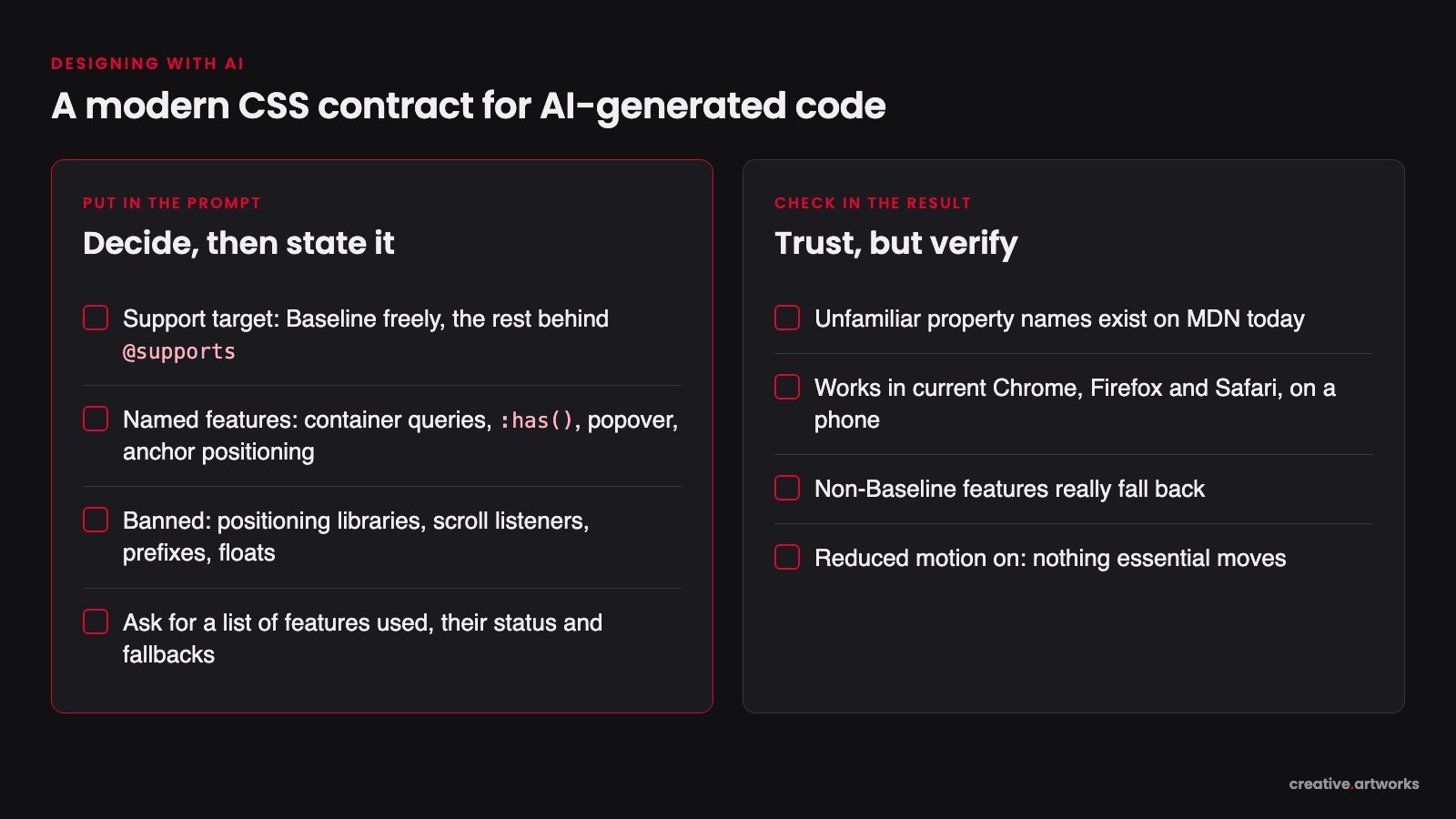
A modern CSS checklist for your next prompt
- Write the support target into the prompt: Baseline freely, everything else as an enhancement behind
@supports. - Name the features you expect: container queries for components,
:has()for state, popover and anchor positioning for floating panels, view transitions for page changes. - List the patterns you do not want: positioning libraries, scroll listeners, vendor prefixes, float layouts,
!important. - Ask the model to list every modern feature it used, its status and its fallback.
- Check unfamiliar property names against MDN before accepting them.
- Test in current Chrome, Firefox and Safari, on desktop and on a phone.
- Test with reduced motion turned on, and with a slow connection.
- Re-check feature status every few months; Interop 2026 will move several of these during the year.
Modern CSS is one of the quiet reasons a well-built site feels fast and solid: less JavaScript, fewer things to break, and components that adapt on their own. AI can write it well, but only when someone asks for it clearly and checks the result. If you would like a second opinion on the code behind your own site, get in touch.
Part of our Designing with AI series: one practical guide on the 15th of every month about using AI for interface design, web design and templates, and doing it well.
Keep reading. Previous: The brief comes before the prompt. Next: Website images without the “AI look”. All articles in Designing with AI.
Sources
- web.dev: Interop 2026
- Mozilla Hacks: Launching Interop 2026
- WebKit: Announcing Interop 2026
- web.dev: New to the web platform in January
- Mozilla: Firefox 147.0 release notes
- web.dev: Baseline
- Vale.Rocks: AI is stifling tech adoption
- Chrome for Developers: Anchor positioning syntax changes
- MDN: Using CSS anchor positioning
- MDN: CSS container queries
- MDN: :has()
- MDN: View Transition API
- MDN: CSS scroll-driven animations