


On 12 August, Lovable announced a $400M Series C at a $13.3B valuation, led by Menlo Ventures. The numbers in the announcement say more about vibe coding and the web than about one company: more than 60 million projects created since the product launched in November 2024, and apps built on the platform receiving over 900 million visits a month. A week earlier, on 5 August, Lovable introduced trust centers, an automatically generated security page for every app published publicly that shows which controls are live, from HTTPS and dependency checks to row-level security on database tables.
Put those two announcements side by side and you have the story of 2026. Building something that looks like a website now takes an afternoon. Building something that is safe, findable, fast and owned by the business still takes the same care it always did. More and more business owners arrive at a design studio with a prototype that already works in the preview window, and the question is no longer “can we build this?” but “is this ready to go live?” Usually, it is not yet. This guide explains why vibe coding gets you a prototype rather than a finished site, and how to close the gap.
What vibe coding is for, and what it is not
Vibe coding, describing what you want and letting an AI agent write the code, is a genuinely good way to explore an idea. You can test a booking flow with real people, show an investor how a product should feel, or find out that the feature you were sure about is confusing. Nielsen Norman Group’s research on AI prototyping tools recommends exactly that: use them early, for ideation, concept exploration and quick prototypes for usability testing.
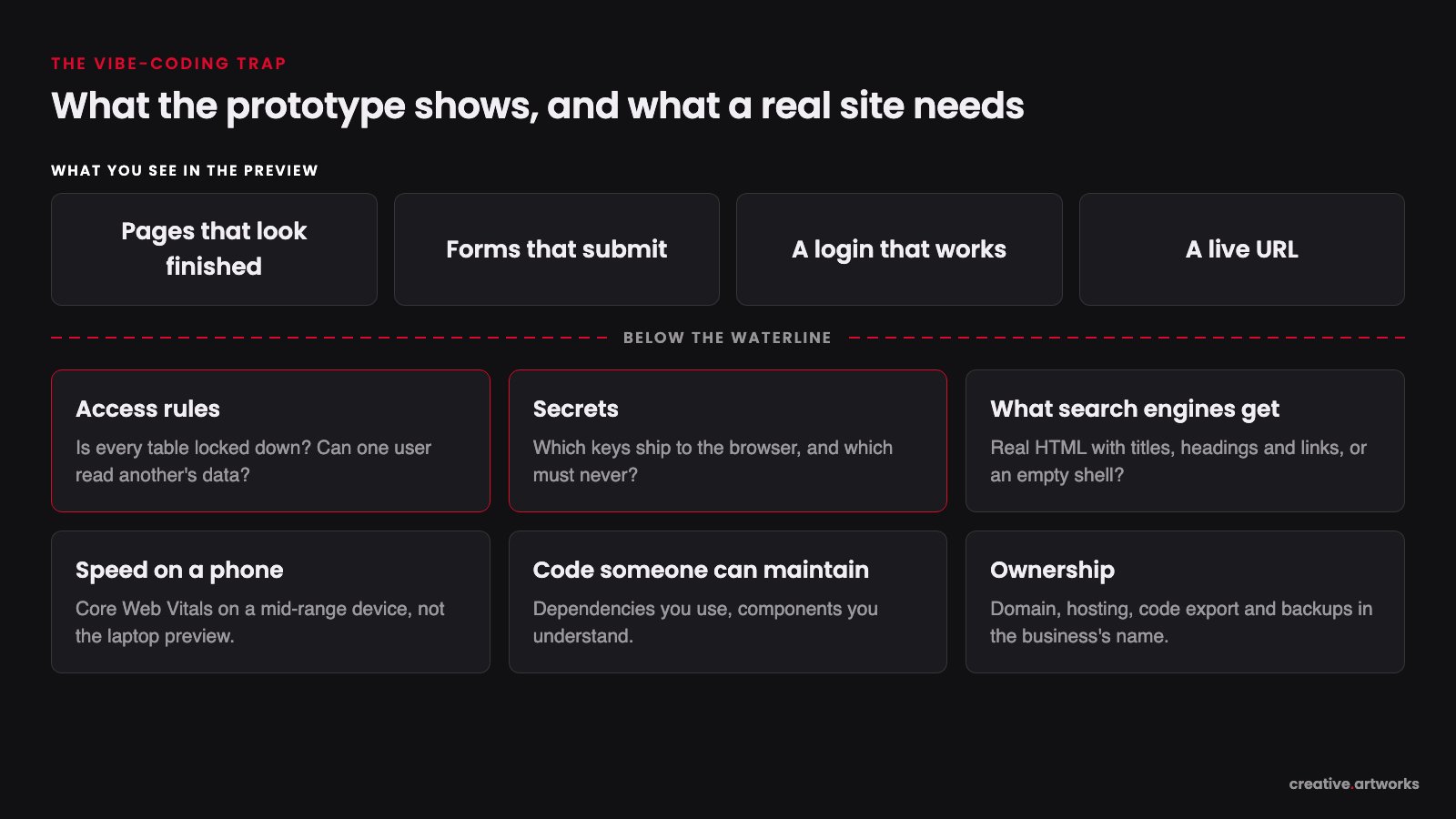
The trap is that the preview looks finished. NN/g also warns that polished AI screens pull attention towards details like button colour before the important questions are settled. In a live product, the important questions are mostly invisible: who can read which data, which keys are exposed, what a search engine sees, how the page behaves on a three-year-old phone, and who owns the code if the platform changes its plans. None of these show up in a screenshot, and all of them decide whether the site helps or hurts the business.
Exposed keys and open databases
The most serious problems are also the most common. Many AI app builders connect the front end directly to a hosted database such as Supabase. That design is safe only if the database has access rules. Supabase’s own documentation is clear: “Enable RLS on every table in an exposed schema”, because “a table in an exposed schema without RLS is readable and writable by any role with a grant on it.” It also says secret keys must never be used in the browser.
In February 2026, the security firm Wiz showed what happens when that step is skipped. Moltbook, a social network for AI agents, had its Supabase key in the production JavaScript bundle and no row-level security. Anyone could read and write the database, which held around 1.5 million API authentication tokens and tens of thousands of email addresses. The key itself was meant to be public; the missing access rules were the problem.
This is not a one-off. Veracode’s 2025 GenAI Code Security Report tested more than 100 language models and found security flaws aligned with the OWASP Top 10 in 45% of the tasks. Its CTO put it bluntly: “GenAI models make the wrong choices nearly half the time, and it’s not improving.”
Platforms are responding. Since June, Lovable runs a basic scan at publish time that checks configuration, database schema and row-level security, and offers a deeper AI code review that it recommends before a public launch. Its new trust centers make some of those results visible to customers. These are real improvements, and you should use them. But Lovable itself says a trust center is not a certification, and the basic scan does not look for logic flaws in your own code. A scanner can tell you the lock is fitted; it cannot tell you whether you gave a key to the wrong person.
Prompt · a security review before launch · Source: Written for this article
You are reviewing this project for security before it goes live. Do not change any code yet.
1. List every place where a key, token or password appears in the code or environment files. For each, say whether it is safe to expose in the browser and why.
2. List every database table. For each, show whether row-level security is enabled and quote its policies in plain English ("a signed-in user can read only their own rows").
3. Find any table, storage bucket or API route that an anonymous visitor can read or write. Explain what an attacker could do with it.
4. Check every form and input for server-side validation.
5. Rank the findings by risk (critical, high, medium, low) and propose the smallest fix for each.
Assume I am not a developer: explain each finding in two sentences.
Then test the result as a person, not a scanner. Create two ordinary accounts. Sign in as the first, note the address of something private, sign in as the second and try to open it. If you can, the access rules are wrong, whatever the scan said.
Code you cannot maintain
In vibe coding, AI agents add code generously. Each new request tends to bring another library, another component or another workaround on top of the last one, and nothing is ever removed. The site still works, but it ships far more JavaScript than it needs, and nobody can say with confidence what each part does.
For context, the HTTP Archive’s 2025 Web Almanac puts the median JavaScript on a mobile page at 646 KB. A brochure site or a small booking flow should not need anywhere near that, yet prototypes built from component libraries and animation packages can pass it easily. Chrome’s DevTools has a Coverage panel that shows, for each script and stylesheet, how many bytes were actually used on the page. It is a quick, honest way to see how much of the bundle is dead weight.
Prompt · find what the project does not need · Source: Written for this article
Audit this project for code and dependencies it does not need.
1. List every package in package.json. For each: what it does, where it is imported, and whether it is actually used.
2. Find components, pages, routes and styles that are never rendered or linked.
3. Find duplicate functionality (two date libraries, two icon sets, two animation libraries) and recommend one.
4. Estimate which removals would cut the most JavaScript sent to the browser.
Present a table first. Then remove only the items I approve, one commit per change, and confirm the site still builds after each.
The “one commit per change” instruction matters. If something breaks later, you can see exactly which removal caused it. That small habit is the difference between a codebase you can hand to another developer and one that can only ever be changed by asking the same AI to try again.
How AI-built sites perform on a real phone
Prototypes are judged on the builder’s laptop, over office broadband. Visitors arrive on mid-range phones on mobile data. Google’s Core Web Vitals give you clear targets: Largest Contentful Paint within 2.5 seconds, Interaction to Next Paint within 200 milliseconds and Cumulative Layout Shift of 0.1 or less, measured at the 75th percentile of real visits.
The common failures in AI-built sites are predictable: hero images uploaded at full camera resolution, web fonts loaded from several sources, every section animated into view, and the whole page waiting for a large JavaScript bundle before showing anything. Test with Lighthouse or PageSpeed Insights in mobile mode, fix the largest image first, then the scripts. We covered image formats and sizes in March.
When you ask an AI agent to fix performance, give it the report, not the goal. “Make the site faster” invites another library or a clever trick. “Here is the Lighthouse report for the home page on mobile; the LCP element is the hero image and it takes 4.1 seconds; fix that one problem without adding dependencies” gets a focused change you can check. Then measure again. Lab tests on your own machine are a starting point; once the site is live, the real-user data in tools such as PageSpeed Insights is what counts, because that is what the 75th percentile is measured on.
SEO: when Google gets an empty page
Many AI app builders produce single-page applications that render everything in the browser. Open the page source of such a site and you often find almost nothing: an empty container, a script tag and sometimes the framework’s default title. Google does render JavaScript, using an evergreen version of Chromium, but its own documentation still says that “server-side or pre-rendering is still a great idea because it makes your website faster for users and crawlers, and not all bots can run JavaScript.” That last point is worth taking literally: not every crawler that might send you visitors runs your scripts.
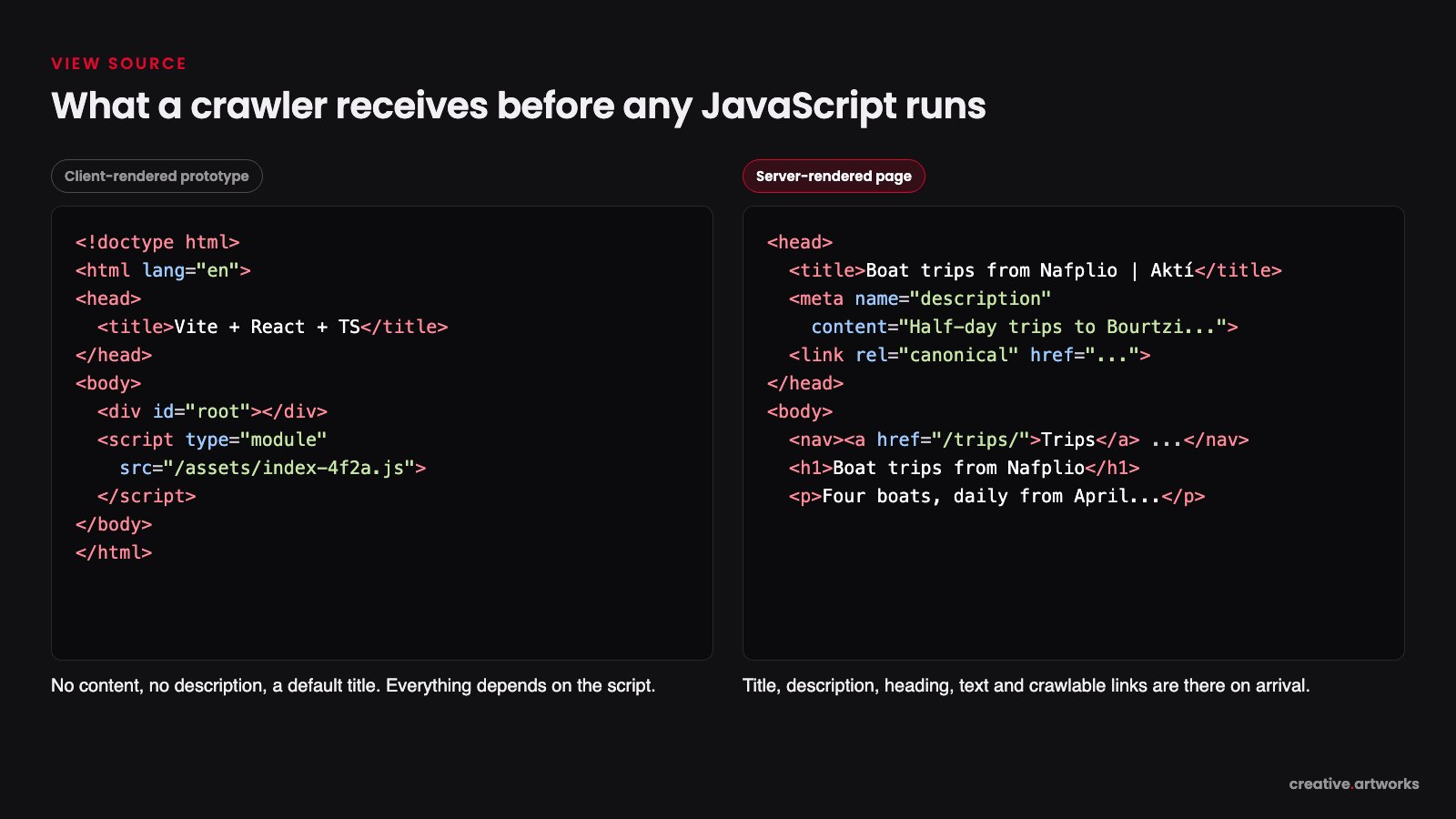
Google’s guidance adds two details that AI-built sites often miss. Links are only discovered if they are real <a> elements with an href, not buttons with click handlers. And each page should have its own descriptive title and meta description. On AI-generated content more broadly, Google’s guidance does not forbid it, but says it is “critical to manually factcheck and review all AI-generated content” before publishing, and that mass-producing pages without adding value can fall under its scaled content abuse policy.
Prompt · check what search engines and AI crawlers see · Source: Written for this article
Check this site for search visibility. For each public page:
1. Show what the raw HTML response contains before any JavaScript runs: title, meta description, canonical URL, H1, main text and links.
2. Flag any page whose main content appears only after JavaScript runs, and propose server-side rendering or static generation for it using this project's framework.
3. Flag navigation that uses buttons or onClick handlers instead of <a href> links.
4. Check for a sitemap.xml, a robots.txt that does not block public pages, and unique titles under 60 characters.
5. List any test, demo or placeholder pages that are publicly reachable and should be removed or set to noindex.
Output a table with page, problem and fix.
Ownership, and a plan B
The least glamorous question is often the most important: if this platform disappears, raises its prices or changes direction, what does the business still own? In July, Figma acquired the team behind Bud, an AI app builder formerly called Orchids, and the service was scheduled to close on 18 July. According to CMSWire, projects hosted on it would go offline, and users had to save their work locally or to GitHub and redeploy elsewhere. That is a reasonable process, but only for people who were ready to move.
Before launch, make sure the domain is registered in the business’s name, not the freelancer’s or the tool’s. Export the code to a repository the business controls. Know where the database lives, how to back it up and how to restore it, and try a restore once. Write down which accounts exist and who has the passwords. If the site collects personal data, it needs the legal pages and consent handling that any other site needs; an AI builder does not make those obligations go away.
Prompt · turn a prototype into a brief for a real build · Source: Written for this article
This prototype was built to test an idea. I want to turn it into a production website.
Write a handover brief covering:
1. What the site does: every page, form and user flow, in plain language.
2. Data: every piece of information collected or stored, where it is stored, and who should be able to see it.
3. External services and accounts the project depends on (hosting, database, email, payments, analytics), and who owns each account.
4. Known shortcuts in the prototype: hard-coded content, fake data, missing validation, placeholder text and images.
5. Open questions for the business owner.
Keep it under two pages. Do not recommend specific vendors.
This brief is useful whatever happens next. If you keep building on the prototype, it is the list of things to fix. If you rebuild, it is the specification. Either way, it turns an impressive demo into something another person can reason about.
A go-live checklist for AI-built sites
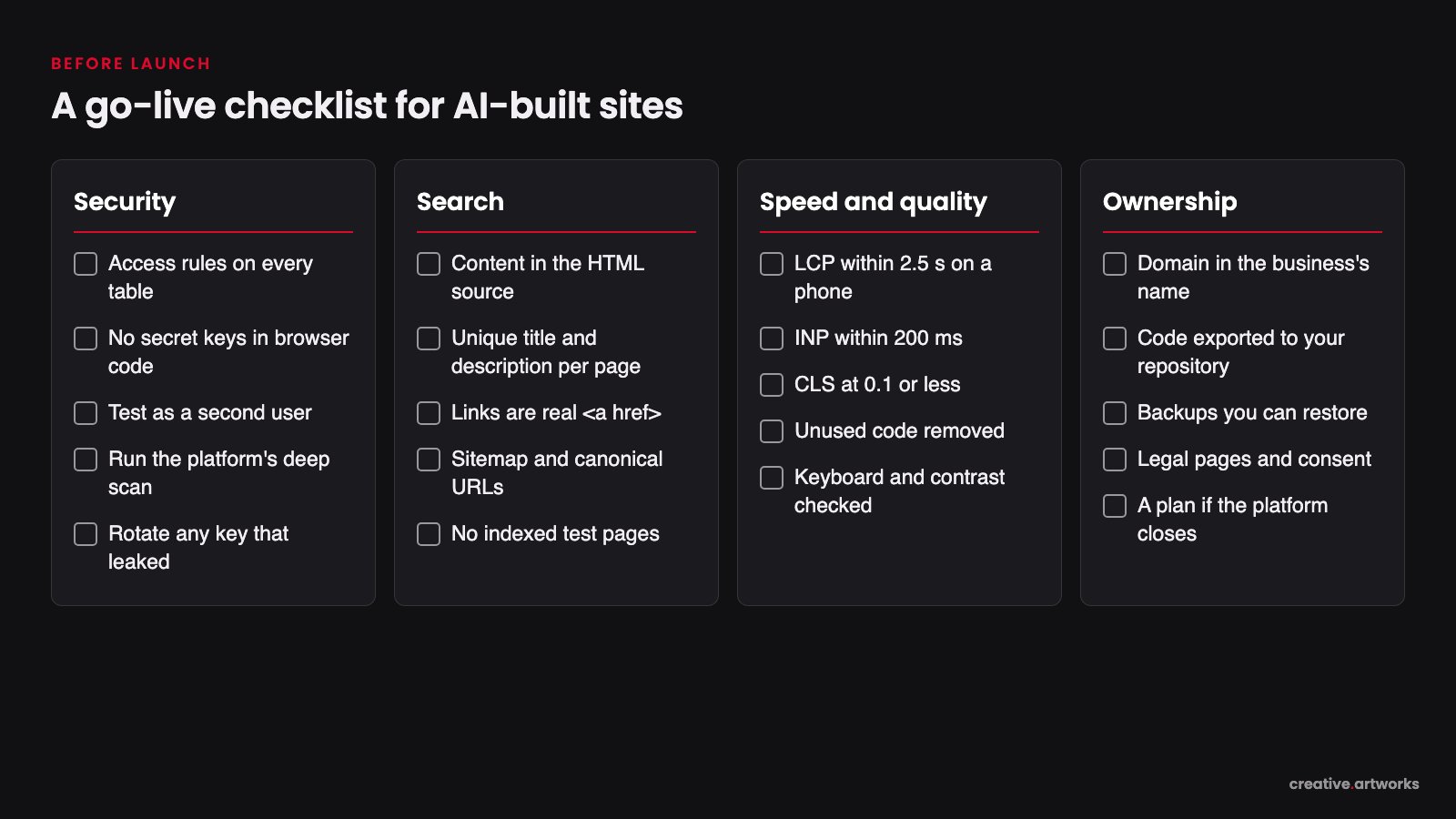
- Access rules. Row-level security, or the equivalent, on every table, with policies you can read aloud in plain English.
- Secrets. No secret keys in browser code or in the repository. Rotate any key that was ever exposed, even briefly.
- Second-user test. Two accounts, each trying to read the other’s data.
- Scans. Run the platform’s deepest available scan, then fix and rescan. Treat a clean result as a minimum, not a certificate.
- Rendered HTML. View source on every key page: title, description, heading and main text should be there without JavaScript.
- Links and sitemap. Real
<a href>links, a sitemap and no indexed test pages. - Core Web Vitals. Test on a phone profile, aiming for LCP within 2.5 s, INP within 200 ms and CLS of 0.1 or less.
- Dead code. Remove unused packages and components, one change at a time.
- Basic accessibility. Tab through every page with the keyboard and check text contrast; we will look at forms and the details AI gets wrong in October.
- Content honesty. Remove placeholder testimonials, invented numbers and demo images.
- Ownership. Domain, code repository, database backups and account list, all in the business’s name.
- Plan B. Know how you would move the site elsewhere, and check that you could.
None of this is an argument against vibe coding or building with AI. The prototype that took an afternoon is a real asset: it has already answered questions that used to take weeks of meetings. It just is not the finished site yet, and the gap between the two is exactly where the risk sits. If you have a prototype and want a second pair of eyes before it goes live, get in touch.
Part of our Designing with AI series: one practical guide on the 15th of every month about using AI for interface design, web design and templates, and doing it well.
Keep reading. Previous: Why every site looks the same, and how to look like yourself. Next: Templates done right. All articles in Designing with AI.
Sources
- Antler: Lovable raises $400M Series C at $13.3B valuation
- Lovable: Trust centers for business
- Lovable: How Lovable protects your apps automatically
- Nielsen Norman Group: Good from Afar, But Far from Good: AI Prototyping in Real Design Contexts
- Supabase: Row Level Security
- Wiz: Exposed Moltbook database reveals millions of API keys
- Help Net Security: Veracode 2025 GenAI Code Security Report
- HTTP Archive: Web Almanac 2025, Page Weight
- Chrome for Developers: Coverage panel
- web.dev: Web Vitals
- Google Search Central: JavaScript SEO basics
- Google Search Central: Guidance on using generative AI content
- CMSWire: Figma buys Bud AI app-builder team, shuts platform