


Three events in four weeks moved AI closer to the place where design decisions are made, and raised a practical question about what to delegate to AI. On 19 May, at Google I/O, Google added real-time collaborative design to Stitch with Stitch Agent, along with exports to its Antigravity coding tool and publishing directly to Netlify. A day later, on 20 May, Figma began a closed beta of its own agent, built into the Figma Design canvas. Figma says it “works with your design system, components, and team context” and can generate layout options, try style variations, convert screens to dark mode, bulk-edit layers and fill designs with copy and images. Figma’s chief design officer Loredana Crisan put it this way: “Teams can now collaborate with agents on the multiplayer canvas to test out ideas.”
Then on 8 June, at WWDC, Apple showed the other side of the story. Its Liquid Glass interface got what SiliconANGLE called “a readability and control pass”: more even refraction, better contrast, crisper icons and a slider that lets people choose how clear or tinted the glass looks. No agent decided that. People looked at real screens in real use and judged that legibility had to win.
That is the question for this month. When an agent sits inside your design file, what should you hand to it, and what should you keep? Here is a practical way to decide, and a review routine for everything you delegate.
What the surveys say
The research so far points in one direction: designers use AI a lot, like the speed, and do not fully trust the output.
- In Figma’s 2025 AI report, a survey of 2,500 users, 78% agreed that AI significantly enhances the efficiency of their work, but only 32% said they can rely on its output.
- Figma’s State of the Designer 2026 report, published in February from a survey of 906 designers, found that 91% say AI tools improve their designs and 89% say they are working faster.
- Designer Fund and Foundation Capital’s AI in Design 2026 report, published on 20 May from more than 900 designers, found that 91% use AI weekly for design tasks, up from 54% a year earlier, and that half have shipped AI-generated code to production. The most common challenge designers cite is “unreliable output quality”.
- The same report found that 73% of designers feel rising expectations around output, quality and speed, while only 28% of leaders say their companies have made formal updates to evaluation, pay or hiring.
There is also a gap between roles. In Figma’s 2025 report, 82% of developers said they were satisfied with AI tools, against 69% of designers. One plausible reading is that code either runs or it does not, while design quality is harder to verify, so designers carry more of the checking burden. That makes the choice of what to delegate a design decision in its own right.
Put together, the picture is clear. AI is now part of everyday design work, and it saves time, but the time saved is easily spent again on checking and correcting. Teams that win are not the ones that delegate the most. They are the ones that delegate the right things and check them well.
A simple test for what to delegate
We find three questions sort almost any design task.
- Can I check the result in under a minute? Twelve layout variations, a dark-mode draft or a set of placeholder product descriptions can be judged at a glance. A navigation structure or a pricing page cannot.
- Is the rule already written down? If your tokens, components and voice are documented (we covered how in April), an agent can apply them. If the rule only exists in someone’s head, the agent will invent one.
- Is it cheap to undo? Renaming layers, swapping copy or trying a variant costs nothing to reverse. Changing the structure of a site that has already been reviewed by a client does.
Three yeses: hand it over. Three noes: keep it. Anything in between: delegate a draft, keep the decision.
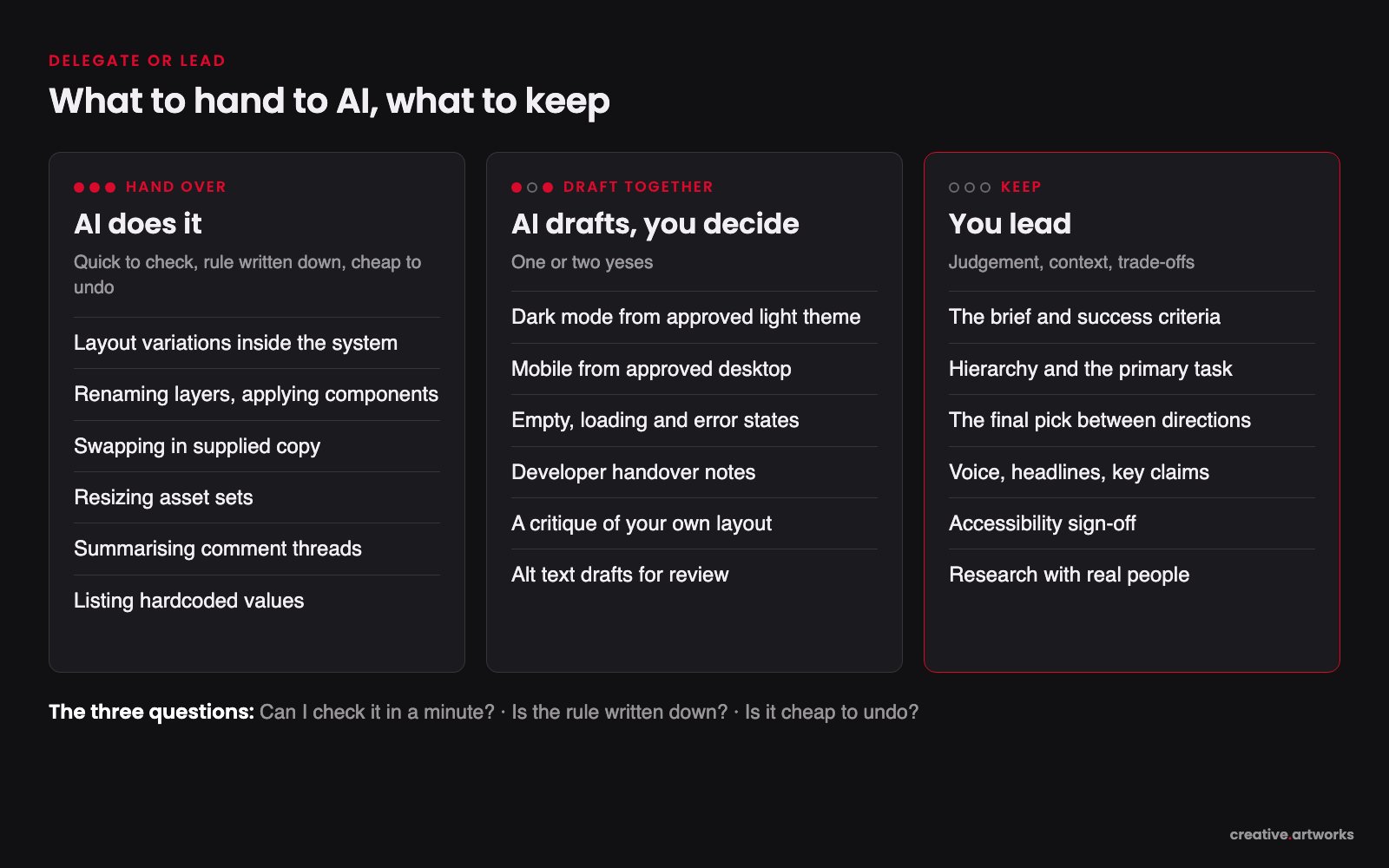
What to hand to AI
These tasks pass the test in most projects. They are also, not by chance, the tasks Figma lists for its agent.
Exploration and variations
Asking for many options inside a fixed system is where AI is most useful and least risky. Nielsen Norman Group, after testing AI prototyping tools, recommends them for early ideation, proofs of concept and quick prototypes for usability tests, rather than late-stage production work. Ten versions of a pricing table take minutes, and looking at them helps you see what you actually want.
Prompt · variations inside the system · Source: Written for this article
Using only the components and tokens in [design system / file], create 6 layout variations of [section, e.g. the pricing table].
Keep the content identical in all six: [plans, prices, features].
Vary only: column count, the position of the recommended plan, how features are grouped, and where the call to action sits.
Label each variation with one line on the trade-off it makes (for example "easier to compare, longer on mobile").
Do not add new colours, fonts, icons or components.
Repetitive production work
Renaming layers, applying the right component across forty screens, swapping placeholder text for real copy, resizing a set of social graphics: this is work with clear rules and quick checks. It is also the work that eats junior designers’ weeks. Figma’s agent is explicitly built to bulk-edit layers and apply components and variables at scale.
Prompt · a bulk edit with a report · Source: Written for this article
In [file / pages], replace every detached button with the [Button] component, matching the variant by colour: [hex] = primary, [hex] = secondary.
Rename layers to [convention, e.g. section/element/state].
Do not change text, spacing or layout.
When finished, list every item you could not match with certainty, with its page and layer name, instead of guessing.
First drafts of derived work
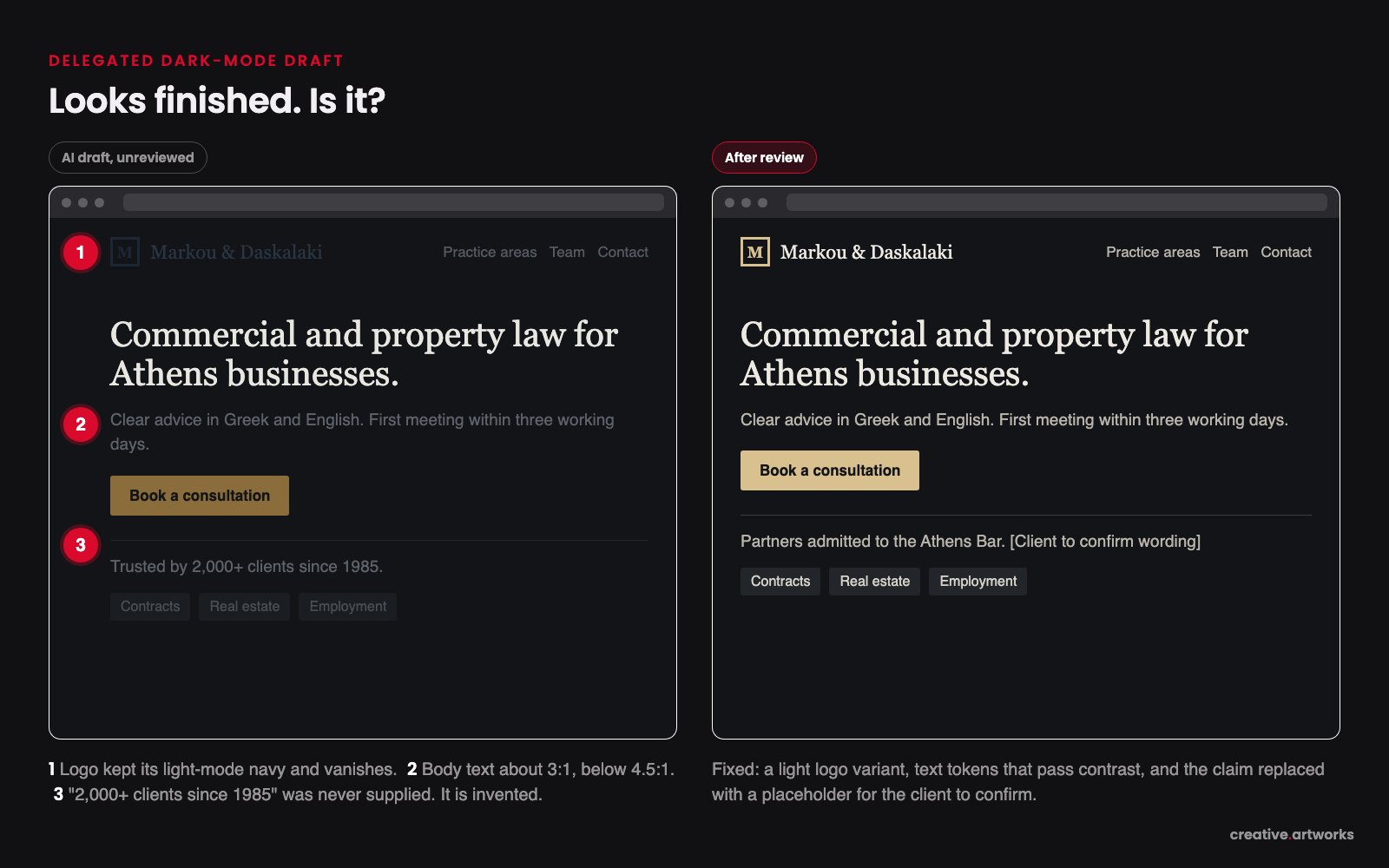
A dark-mode version of an approved light theme, a mobile version of an approved desktop layout, a set of empty and error states for an approved screen. The direction is already decided; the agent drafts the consequences. Treat the result as a draft, because derived work is where small errors hide, as the figure later in this article shows.
Prompt · a dark-mode draft that flags its own risks · Source: Written for this article
Create a dark-mode version of [screen], using the dark tokens in [file]. If a dark token is missing, do not invent one: list it.
Keep layout, type sizes and copy identical.
After the draft, report:
1. Every text/background pair with its contrast ratio, marking anything below 4.5:1 (3:1 for large text and UI borders).
2. Any brand colour used on a dark surface, with its contrast.
3. Images or logos that may need a dark version.
4. Shadows that no longer read on dark backgrounds.
Summaries and handover notes
Summarising a long comment thread, writing a first version of the handover notes for a developer, or listing every state a screen needs: all quick to check, all tedious to write. Figma’s agent can summarise comments; any capable model can draft the notes.
One caution applies to all four groups. Delegating a task does not delegate responsibility for it. If an agent fills a page with copy, the copy still goes out under your client’s name, and if it converts a screen to dark mode, the contrast is still your problem. The point of choosing checkable tasks is that you can actually take that responsibility in the time you saved.
What to keep instead of delegating
NN/g’s State of UX 2026 names the skills hardest to automate: “Curated taste, research-informed contextual understanding, critical thinking, and careful judgment.” It also gives a warning worth printing: “If you’re just slapping together components from a design system, you’re already replaceable by AI.” The work below is what not to delegate to AI, and where a designer earns their place.
- The brief. What the site is for, who it serves, what success looks like. An agent can help you think, but it cannot know your client’s business.
- Hierarchy and the primary task. What comes first on each page. NN/g found AI outputs often lacked visual hierarchy and grouping, even with detailed prompts.
- The final choice between directions. Ask for six options; choose one yourself, for reasons you can explain to a client.
- Voice and key messages. Headlines, the main claims, anything a customer will quote back.
- Trade-offs. Speed versus richness, clarity versus brand expression, what to cut. Apple’s Liquid Glass changes are a public example of this kind of judgement.
- Accessibility sign-off. AI can measure contrast. It cannot tell you whether a keyboard user can actually complete the checkout. That needs a person, and ideally real users.
- Research with real people. NN/g puts it plainly: “human direction, curation, and verification will continue to be essential.”
None of these is a reason to avoid AI. You can ask a model to argue against your hierarchy, list the trade-offs you missed or critique your brief. The difference is who decides.
Keeping a task also means keeping the conversation around it. Clients rarely object to a layout because of the layout; they object because it does not match how they see their business. Those conversations, and the trust that comes from them, are the part of the job no canvas agent joins.
Prompt · a critic, not a decider · Source: Written for this article
Here is the brief: [brief]. Here is the proposed homepage: [screenshot or file].
Act as a critical senior designer. Do not redesign anything.
1. In one sentence each, what is the primary task, and does the page make it the most visible thing?
2. List the three weakest decisions on the page and what each one costs the user.
3. List any claim, label or term a first-time visitor might misread.
4. Name one thing the page does well that should not be changed.
Be specific: refer to sections by their headings.
A review routine for everything you delegate to AI
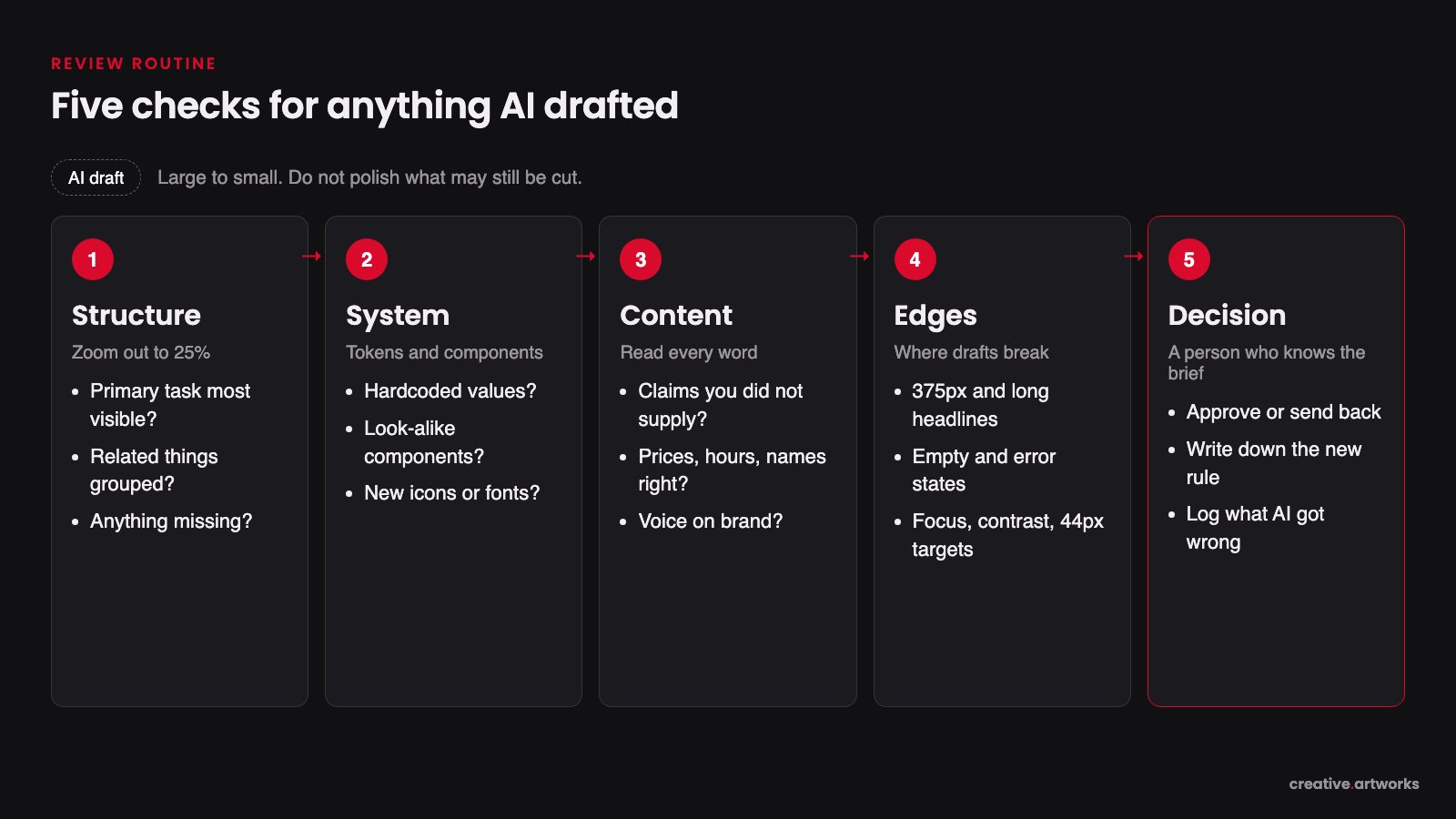
Delegation without review is how a site ends up looking finished and working badly. NN/g puts it in one line: “don’t confuse visual fidelity with design quality.” AI output is usually polished on the surface, which makes problems underneath harder to notice. A fixed routine helps, because it makes you look at the same things every time, in the same order.
- Structure first. Squint at the page or zoom out to 25%. Is the primary task the most visible element? Are related things grouped? Do not look at colours or copy yet.
- System second. Are all values from your tokens? Are all components real components, not look-alikes? Ask the model to list anything hardcoded.
- Content third. Read every word. AI fills gaps with plausible copy, and plausible is not the same as true: check prices, opening hours, claims and names.
- Edges fourth. Check the phone width, the longest headline, the empty state, the error state, keyboard focus and contrast.
- A human decision last. Someone who knows the brief approves it, and writes down any new rule it taught you.
The order matters because each step makes the next one cheaper. There is no point correcting a hex value on a section that will be removed for structural reasons, or proofreading copy in a component that is about to be replaced. Working from large to small also stops a polished surface from persuading you that the whole thing is finished.
Prompt · a self-check before you review · Source: Written for this article
Before I review [page], check your own output and report, without changing anything:
- Values not taken from [token file], with where they appear.
- Elements that look like components but are not instances of them.
- Any text you wrote that is not in the content I supplied (claims, numbers, names, dates).
- Text that overflows or wraps badly at 375px, 768px and 1280px.
- Interactive elements with no visible focus style or smaller than 44px.
Give the list in this order. Say "none found" for empty categories.
The third item in that prompt matters more than it looks. Models are very good at writing sentences that sound right for a business, such as an opening year, a number of happy customers or an award. If you did not supply it, treat it as invented until proven otherwise.
Putting it into practice this week
- List the ten tasks that took most of your design time last month.
- Run each through the three questions: quick to check, rule written down, cheap to undo.
- Pick two tasks with three yeses and hand them to AI this week, using a prompt that asks for a report of anything uncertain.
- For tasks in between, delegate the draft and write down who makes the decision.
- Adopt the five-step review for everything AI touches, in that order.
- After each review, add any new rule to your brand or system file, so the next draft starts better.
- Keep a short log of what the agent got wrong. After a month, it tells you what to stop delegating, and what to document better.
The agent is on the canvas. The decision is still yours.
The tools launched this spring are useful, and they will take over a lot of production work. That is good news if you spend the time on the parts that need a person: understanding the business, setting the hierarchy, choosing, and checking. Next month we look at why so many sites now look alike, and how to make yours look like itself. If you want a second pair of eyes on what your team should delegate to AI and how to review it, get in touch.
Part of our Designing with AI series: one practical guide on the 15th of every month about using AI for interface design, web design and templates, and doing it well.
Keep reading. Previous: Prompting UI: from vague to specific. Next: Why every site looks the same, and how to look like yourself. All articles in Designing with AI.
Sources
- MacRumors: Google I/O 2026 Roundup
- Google: Google I/O 2026, all our announcements
- Figma Forum: Figma’s AI agent is here and it’s rolling out now
- The Next Web: Figma builds its own AI assistant that can design alongside you on the canvas
- SiliconANGLE: Apple refines Liquid Glass design and expands child safety tools at WWDC
- Figma: Figma’s 2025 AI report: Perspectives from designers and developers
- Figma: State of the Designer 2026
- Designer Fund: AI in Design 2026: The inflection point is here
- Nielsen Norman Group: State of UX 2026
- Nielsen Norman Group: Good from Afar, But Far from Good: AI Prototyping in Real Design Contexts
- Nielsen Norman Group: Prompt to Design Interfaces: Why Vague Prompts Fail and How to Fix Them