

On 18 March, Google relaunched Stitch, its free AI design tool in Google Labs, as what it calls “vibe design”: an infinite canvas, a design agent, voice commands and the ability to generate up to five screens at once. The feature that matters most for brands, and for anyone who keeps design tokens, was the least flashy one. Stitch can now export and import a design system as DESIGN.md, which Google describes as “an agent-friendly markdown file”, so the rules you set in one project can travel to other design and coding tools. It can also extract a design system from any URL.
That is a small file with a big idea behind it. Five months earlier, on 28 October 2025, the W3C Design Tokens Community Group published the first stable version of its format (2025.10), a vendor-neutral way to store colours, type and spacing so that tools can share them. Put the two together and the direction is clear: if you want AI tools to produce work that looks like you, your brand has to exist as something a machine can read. A PDF of brand guidelines that lives in a shared drive does not count.
This guide explains what to write down, how to write it so that a model follows it, where the files go, and how to check that outputs stay on brand.
Why AI drifts away from your brand
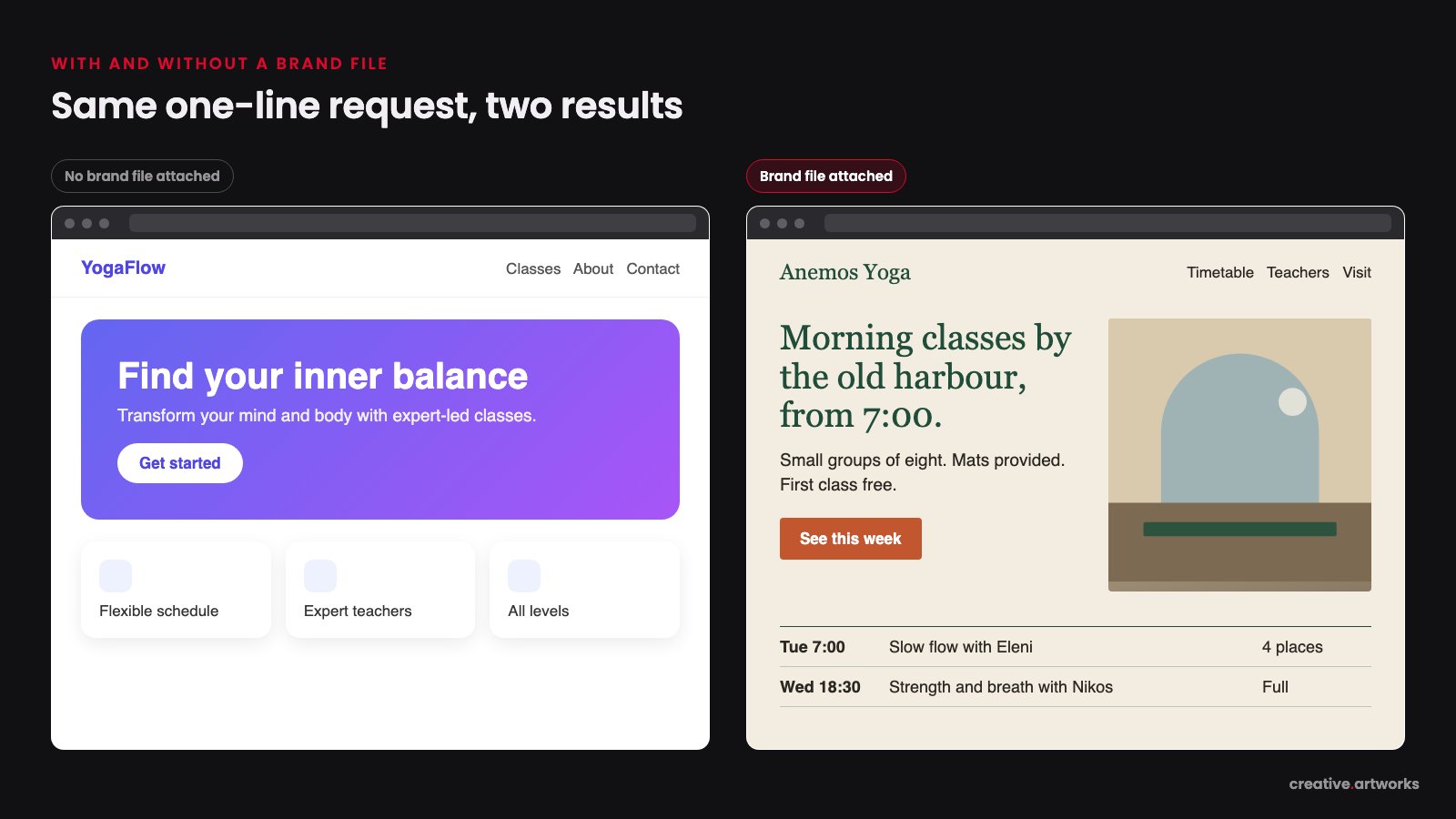
In January we argued that the brief comes before the prompt. The brand file is the part of the brief that stays the same from project to project, and it solves a specific problem. Anthropic’s frontend design article from November 2025 explains it plainly: models predict output from statistical patterns, and “without direction, Claude samples from this high-probability center.” The same is true of every other model. Ask for a website and you get the average website: a familiar sans-serif, a safe blue or purple, rounded cards, generous but characterless spacing.
Typing “use our brand colours” into a chat does not fix this. The model does not know your colours, and if you paste a hex code once, it will forget the rule three prompts later or apply it to the wrong things. What works is a written, stable source of truth that every session reads first. Brad Frost, who has spent years on design systems, describes the goal well: in a design system plus AI workflow, “the AI is deliberately constrained to using the high-quality design system materials.” Constraint is the point. The tighter and clearer the materials, the less room the model has to fall back on its defaults.
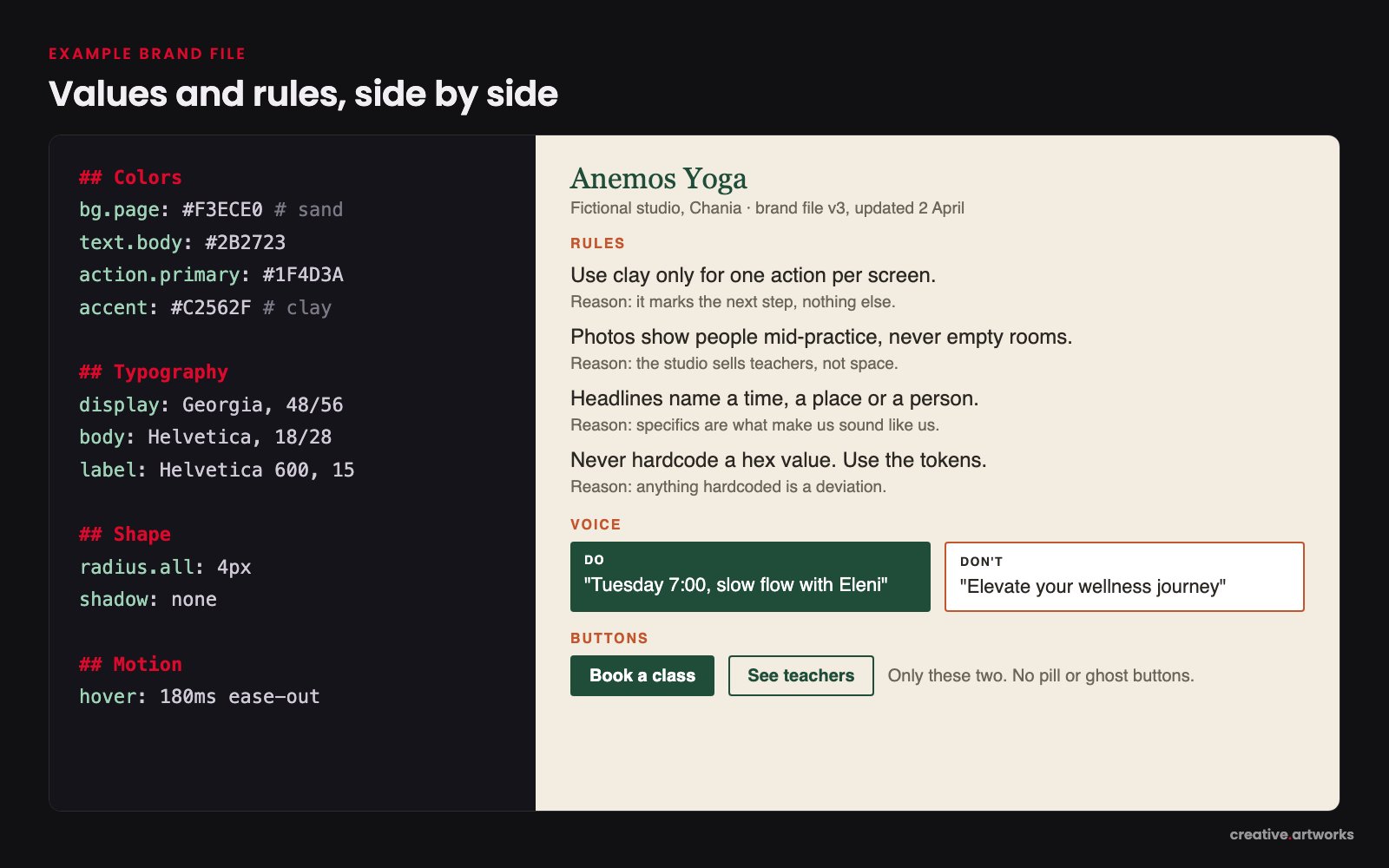
Your brand file needs two layers. The first is the exact values: design tokens. The second is the judgement: when and how to use those values, written as rules.
Layer one: design tokens, the exact values
A design token is a named decision. Instead of “#1F4D3A” you write color.brand.forest, and everything that needs that green refers to the name. Tokens are not new, but they matter more with AI because names carry meaning that raw values do not. A model that sees color.text.muted knows what the colour is for. A model that sees “#6B7280” only knows it is grey.
What to include
- Colour. Four to eight brand colours, plus the roles they play: background, surface, text, muted text, accent, border, error and success. Most brand drift happens because the palette exists but the roles do not.
- Typography. Font families with fallbacks, a type scale (for example five sizes from caption to display), weights you allow, line heights and any letter-spacing rules.
- Spacing. A short scale, such as 4, 8, 12, 16, 24, 32, 48 and 64 pixels. Fewer steps means more consistent output.
- Shape. Corner radius for buttons, inputs, cards and images. This single value changes the character of an interface more than most people expect.
- Elevation and borders. Whether you use shadows at all, and if so, which ones.
- Motion. A duration and an easing curve for hovers and transitions. Even one line here prevents the scattered, bouncy animations AI tends to add.
Name tokens in layers
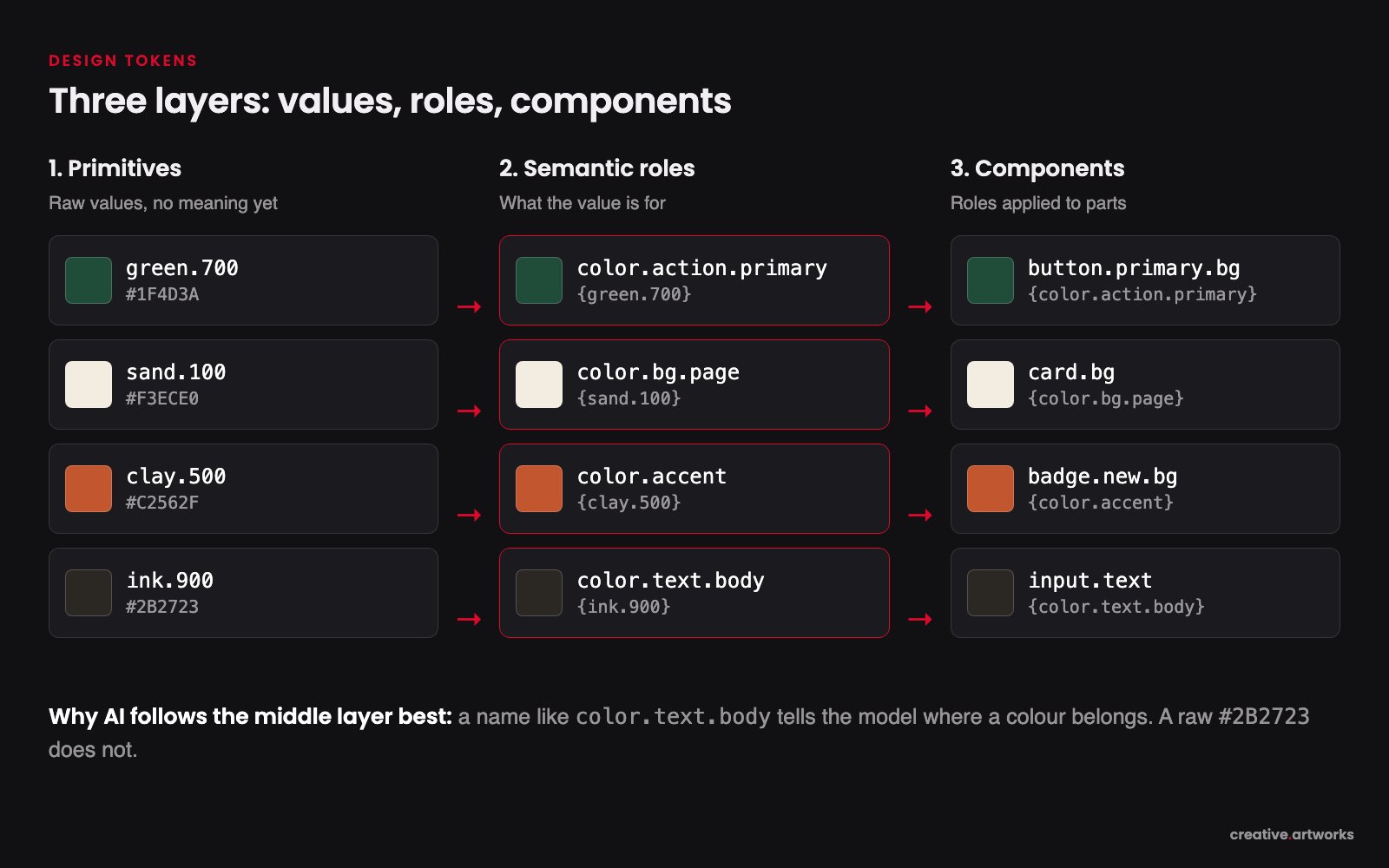
The most useful structure has three levels. Primitive tokens hold raw values (green.700). Semantic tokens say what a value is for (color.action.primary points to green.700). Component tokens apply semantics to a specific part (button.primary.background points to color.action.primary). The stable DTCG format supports exactly this: a token is any object with a $value, and one token can reference another with curly braces, such as {color.action.primary}. It also supports themes such as light and dark modes without duplicating files, and modern colour spaces including Oklch and Display P3.
For AI work, the semantic layer is the one that earns its keep. When a model has to choose a colour for a link, a warning or a selected tab, a semantic name answers the question before it is asked.
Prompt · extract a draft token set from what you already have · Source: Written for this article
I am attaching [screenshots of our homepage, product page and contact page] and [our brand guidelines PDF].
Extract a draft design token set. Use three levels: primitives (raw values), semantic roles (background, surface, text, text-muted, accent, border, error, success, focus) and component tokens for button, input, card and link.
For each semantic token, give the value, the primitive it points to, and one sentence on where it is used.
Flag every value you had to guess, every colour that appears only once, and every text/background pair that falls below 4.5:1 contrast.
Output as a JSON object using $value, $type and $description, with aliases in curly braces.
Do not invent new colours or fonts. If something is missing, list it as a question at the end.
Treat the result as a draft. The model will find the colours that appear on the page, but only you know which ones are deliberate and which are leftovers from an old campaign. Expect to delete a few values and merge near-duplicates, such as three slightly different greys.
Layer two: rules written for a reader that takes you literally
Tokens say what the values are. They do not say “never put the accent colour behind body text” or “photos are always people at work, never empty rooms”. That is the job of the prose layer, and it is where most brand files are weakest, because they are written like brand books: inspiring, vague, and full of words such as “sparingly” and “where appropriate”.
Figma’s developer documentation on writing design system guidelines for its Make tool is useful here, whichever tool you use. It asks for clear, concise language and gives a good example: “Do not use small text for anything except captions” is better than “Use small text sparingly”.
How to write rules a model follows
- Use direct commands. “Buttons use sentence case.” Not “We generally prefer sentence case.”
- List what is allowed and what is not. “Button variants: primary, secondary, text. There is no ghost or outline button.”
- Pair a wrong example with a right one. Models learn the boundary faster from a contrast than from a description.
- Give the reason in one line. “Accent red is for one action per screen, because it signals the next step.” Reasons help the model handle cases you did not foresee.
- Write the voice down too. Three adjectives are not enough. Add five phrases you would use, five you never would, and how you write a button label, an error message and a headline.
- Keep it short. Figma notes that its tool, “like all AI products, tends to work better when it has only the context that’s relevant for its current task”, which is why it suggests splitting guidelines into separate files by topic. A brand file of one to three pages is a good start.
Prompt · turn a brand book into rules a model can follow · Source: Written for this article, following Figma’s guideline-writing advice
Here is our brand book: [paste text or attach PDF].
Rewrite it as a brand file for AI design and coding tools. Rules:
- Every rule is one imperative sentence, followed by a one-line reason.
- Replace vague words (sparingly, where appropriate, modern, clean) with a concrete limit or an example.
- For colour, type, buttons, images and copy, list allowed values and forbidden values.
- Add a "Do / Don't" pair for each section.
- Add a Voice section: 5 phrases we would write, 5 we never would, and one example each of a headline, a button label and an error message.
Keep the whole file under 900 words. Do not add rules that are not supported by the brand book; list any gaps as questions at the end.
Where design tokens and rules live
The good news is that the formats are converging, and they are all plain text. You do not need to pick a winner. Write the content once and place it where your tools look.
- DESIGN.md. Google’s format for Stitch, which can export and import design rules as a Markdown file. If you start designs in Stitch, this is where your tokens and rules live.
- AGENTS.md. Described on its site as “a simple, open format for guiding coding agents”, a README written for AI. It is now stewarded by the Agentic AI Foundation under the Linux Foundation, and the project says it is used by over 60,000 open-source projects. If a developer or a coding agent builds your site, put a short design section here and link to the full brand file.
- Agent Skills. An open format originally developed by Anthropic and now supported by a growing list of agent products. A skill is a folder with a
SKILL.mdfile that has a name, a description and instructions. Agents load only the name and description at first, and read the full instructions when a task matches. That makes skills a good home for a “how we design” package: the brand file, the anti-default rules and a review checklist, loaded only when design work starts. - Tool-specific guideline folders and rules files. Many design and coding tools read their own guidelines folder or project rules. The content is the same; only the location changes.
- The token file itself. A
.tokens.jsonfile in the DTCG format, or your CMS’s own theme settings, which the code reads directly.
One warning: the more copies you keep, the faster they drift apart. Keep one master version, date it, and treat the others as generated copies.
Prompt · package the brand file as a reusable skill · Source: Written for this article, based on the Agent Skills format
Create an Agent Skill folder called [brand-name]-design.
SKILL.md must start with frontmatter:
name: [brand-name]-design
description: Use when designing or building any page, component, email or social graphic for [brand]. Applies [brand]'s tokens, layout rules and voice, and runs a brand review before finishing.
In the body, write:
1. "Read tokens.json and brand-rules.md before writing any code or copy."
2. The five rules most often broken, each with a wrong and a right example.
3. A review step: before you finish, list every value not taken from tokens.json and every phrase that breaks the Voice section, then fix them.
Put the token file in references/tokens.json and the rules in references/brand-rules.md. Do not duplicate their contents inside SKILL.md.
Using the brand file in a prompt
Having the file is half the work. The other half is making the model commit to it. Three habits help.
First, tell the model to read the file before it starts, and say what to do when the file has no answer. Without that instruction, a model that cannot find a matching component will quietly invent one, which is the most common way systems get bypassed.
Second, ban raw values. Tell the model to use token names only and never to hardcode hex values. That single rule makes off-brand output easy to spot, because anything hardcoded is by definition a deviation.
Third, ask for the decisions before the build. A short summary of which tokens and components the model plans to use takes seconds to read and saves a full rebuild.
Prompt · build a page inside the brand file · Source: Written for this article
Read DESIGN.md (or brand-rules.md and tokens.json) before you start.
Build [page: e.g. the class timetable page] for [brand].
Use only the colour, type, spacing, radius and motion tokens from the file. Do not hardcode hex values, pixel sizes or font names.
Use only the components listed in the file. If you need one that does not exist, stop and describe it instead of inventing it.
Before writing code, reply with: the sections you plan, the tokens each section uses, and any rule you are unsure how to apply. Wait for my OK.
Keeping outputs on brand over time
A brand file is not a one-off document. Every project teaches you a rule you had not written down: how a table should look, what to do with a third button, whether an icon can be filled. If that decision stays in a chat history, the next session will not know it.
A simple routine works. After each piece of AI-assisted work, ask the model to audit the output against the file, then decide which of the deviations were mistakes and which were good ideas that deserve a new rule. Fix the first group in the output. Add the second group to the master file, with a date.
Prompt · audit a page against the brand file · Source: Written for this article
Compare [the attached page / the code in this folder] with our brand file [DESIGN.md or brand-rules.md + tokens.json].
List, in a table:
1. Every colour, font, size, spacing or radius value that does not come from a token.
2. Every component that is not in the file.
3. Every piece of copy that breaks the Voice rules, with the rule it breaks.
4. Every text/background pair below 4.5:1 contrast.
For each item, suggest a fix that uses existing tokens. Do not change anything yet. Mark items where the file itself has no rule as "file gap".
The “file gap” items are the most valuable part of the audit. They show you exactly where your brand is still undefined, which is also where AI output will keep looking generic.
A one-afternoon brand file: step by step
- Collect what exists. Brand guidelines, three or four screenshots of your best pages, your logo files and a few pieces of copy you are proud of.
- Extract draft tokens. Use the first prompt above. Delete accidental values and merge near-duplicates.
- Name the roles. Make sure every colour has a semantic name, and that text and background pairs pass contrast.
- Write ten rules. The ten things you correct most often in other people’s work. Imperative, with a reason and a do/don’t pair.
- Write the voice. Five phrases in, five out, one headline, one button, one error message.
- Save one master file. Date it. Generate the DESIGN.md, AGENTS.md section or skill from it, not the other way round.
- Test it. Ask for the same page with and without the file. If you cannot tell the results apart, the rules are too vague.
- Review monthly. Add rules from audits, remove rules nobody breaks.
The file is the brand, as far as the machine knows
Tools will keep changing. This year alone, Stitch has been rebuilt around an agent and a canvas. The constant is that every one of them works better when it is told exactly what your brand is, in plain text, with values and reasons. Writing that brand file is design work: it forces decisions that many brands have avoided for years. If you would like help turning your brand into tokens, rules and a file your team and your tools can share, get in touch.
Part of our Designing with AI series: one practical guide on the 15th of every month about using AI for interface design, web design and templates, and doing it well.
Keep reading. Previous: Website images without the “AI look”. Next: Prompting UI: from vague to specific. All articles in Designing with AI.
Sources
- Google: Introducing “vibe design” with Stitch
- SiliconANGLE: Google upgrades Stitch AI interface development tool
- W3C Design Tokens Community Group: Design Tokens specification reaches first stable version
- Design Tokens Community Group: Design Tokens Format Module 2025.10
- Anthropic: Improving frontend design through Skills
- Brad Frost: Agentic Design Systems in 2026
- Figma Developer Docs: Write design system guidelines for Figma Make
- AGENTS.md: A simple, open format for guiding coding agents
- Agent Skills: Overview